
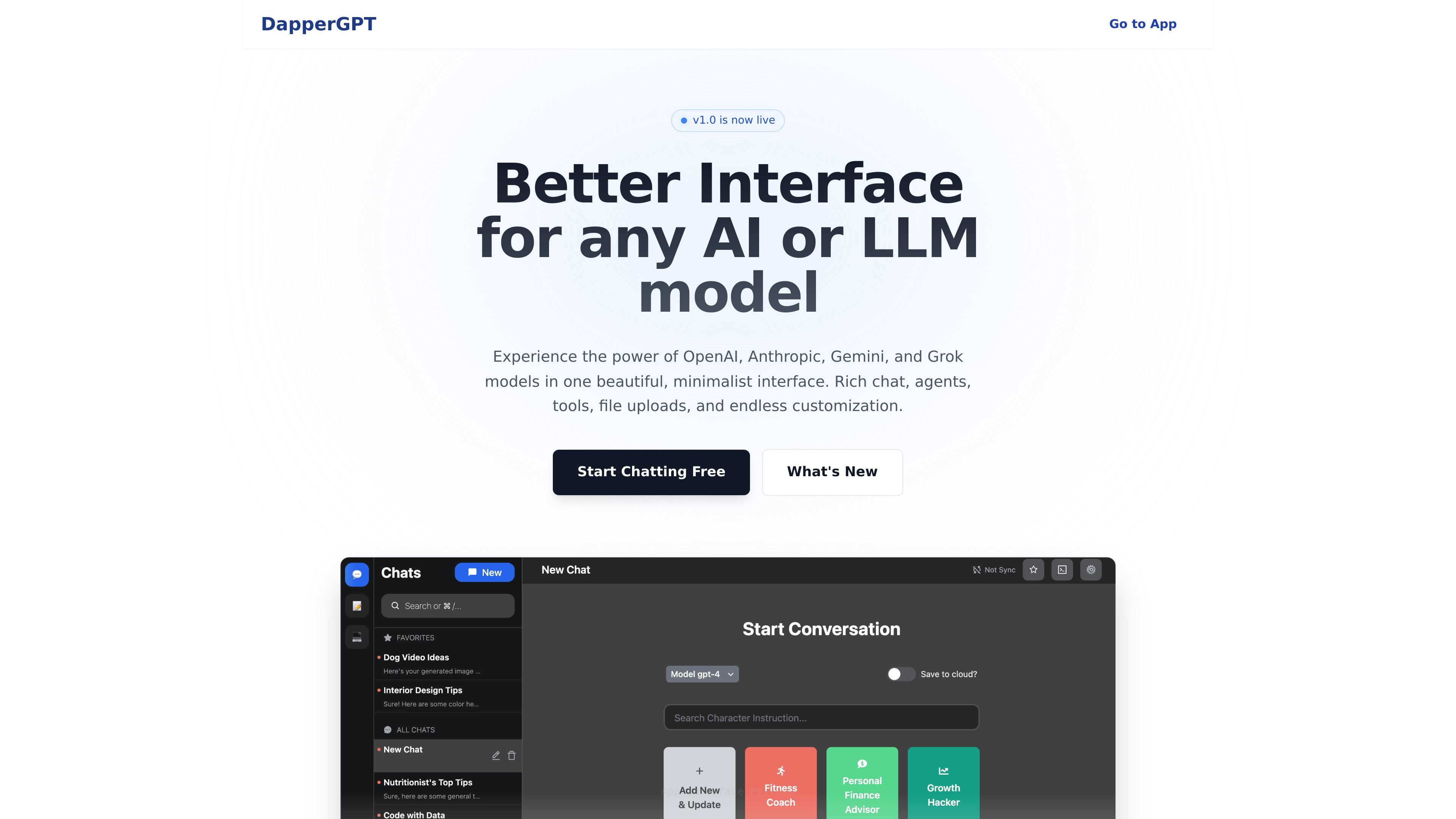
Multi-model support
Use one interface across OpenAI, Anthropic, Gemini, Mistral, Grok, and Llama, which helps when you work across multiple providers or compare model behavior.

Browser-based AI chat with your API keys across leading models
DapperGPT is a browser-based AI chat interface designed to work with your own API keys across several major model providers. The site describes it as a better UI for any AI or LLM model, with a focus on speed, organization, and power-user workflows.
It is positioned as an alternative front end for ChatGPT-style use, but with added features such as folders, prompt libraries, notes, search, tools, agents, and file uploads. The product pages also show support for OpenAI, Anthropic, Gemini, Mistral, Grok, and Llama, with a local-key setup for users who want to connect their own account credentials.
Use one interface across OpenAI, Anthropic, Gemini, Mistral, Grok, and Llama, which helps when you work across multiple providers or compare model behavior.
Upload images and documents, and work with visual content inside chat for richer prompts and review workflows.
Find conversations or notes with Spotlight-like search, making it easier to return to earlier prompts and outputs.
Organize chats with folders, tags, pinning, and prompt libraries so recurring work is easier to retrieve.
Extend chats with browsing, code execution, custom toolchains, and micro-plugins for more advanced workflows.
Use speech-style agents that can think, plan, and execute tasks, and bring the interface into websites through a browser extension that is listed as coming soon.
Use DapperGPT when you want one chat interface for several AI providers instead of switching between separate vendor apps.
Use the folders, tags, prompt library, and search features to keep recurring prompts, notes, and past conversations organized.
Use uploaded images or documents, plus tools and code execution, when your workflow needs more than plain text prompting.
Use the agent workflow when you want the assistant to think through a task in multiple steps rather than answering in a single turn.
Use the browser-oriented interface and local API-key setup if you prefer to control your own usage and data flow instead of relying on a bundled subscription.
Yes. The homepage says basic features are free, and the OpenAI API UI page says you only pay the model provider for API usage when you connect your own key.
DapperGPT is built for OpenAI, Anthropic, Gemini, Mistral, Grok, and Llama according to the homepage and product pages.
The site says your API key is stored locally in your browser.
The product page shows chat history and notes search, and the Chat page highlights smart search as a core feature.
The site presents DapperGPT as a better ChatGPT or API UI, so it is positioned as a UI alternative rather than the default chat interfaces.
Traffic data is for reference only.

discode.ai
Browser-based AI chat routing prompts across models with privacy, verification, and eco controls.

writingmate.ai
A web-based AI workspace for chat, search, files, images, and video

chatkit.app
Desktop AI chat app for macOS, Windows, and Linux with flexible model support
cherry-ai.com
Cherry Studio is a free, open-source desktop AI assistant for Windows, macOS, and Linux, integrating 300+ models for chat, knowledge bases, image generation, and translation.
chatwise.app
ChatWise is a desktop AI chatbot for ChatGPT, Claude, Gemini, DeepSeek, and Llama in one app, with local storage, web search, multimodal input, and a one-time Pro plan.

chatbotsplace.com
ChatbotsPlace: chat with multiple AI models and use media tools