
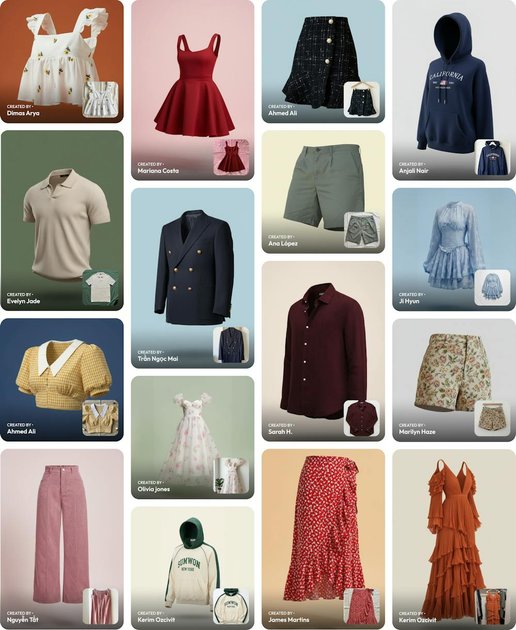
Ghost mannequin generation
Create invisible-mannequin apparel images from a single product upload, then save, enhance, or export the result for ecommerce listings.

AI product visuals for ecommerce, from photos to scenes, try-ons, studio shots, and video
Blend is an AI product-visuals platform for ecommerce brands, marketplace sellers, and catalogue teams. It generates product images such as ghost mannequin apparel shots, lifestyle scenes, AI model try-ons, studio shots, and video from uploaded product photos.
The site positions the product around faster visual production without a traditional photo shoot. The workflow shown across product pages is simple: upload an image, choose a model or scene, then save, customize, or export the result for listings and marketing use.
Create invisible-mannequin apparel images from a single product upload, then save, enhance, or export the result for ecommerce listings.
Turn a product photo into a staged scene by choosing from suggested ideas or entering your own scene prompt.
Place clothing and jewelry on AI-generated models to show how items look on different body types without a model shoot.
Use background removal, AI backgrounds, studio shots, image upscaling, magic eraser, and product recolor tools to prepare listing-ready assets.
Generate product motion content with AI video for reels, ads, and listings, with MAX allowing longer videos than PRO.
Work at higher volume with batch processing and plan-based credit allowances for teams handling many SKUs.
Generate on-model apparel images without booking a studio session, especially for clothing, shoes, and accessories that need a clean ecommerce presentation.
Create marketplace-ready product images with white-background or studio-style presentation for Amazon and Etsy listings.
Build a consistent visual style across website banners, social posts, and product pages using lifestyle scenes and templates.
Show cosmetics, skincare, wellness, furniture, décor, and home accessories in contextual scenes such as bathrooms, desks, bedrooms, or living rooms.
Process large image sets with batch workflows and plan allowances when a team needs to produce or format many SKUs.
Blend’s product pages show the workflow as upload image, pick a result or scene, and save or customize the output. For ghost mannequin and lifestyle shots, the site describes generating apparel or product visuals from a single uploaded image.
The site’s ghost mannequin page says it works best with clothing images, including men’s, women’s, kids’, top wear, bottom wear, dresses, and suits. The lifestyle shot page says any product can be used.
The pricing page lists PRO and MAX plans and says PRO includes access to all features with 1,000 credits a month, while MAX is aimed at higher-volume sellers with 3x PRO credits and the ability to buy more credits. The site also mentions HD exports and 1,000+ templates on PRO.
Yes. The ghost mannequin page says you can customize background color and angles, and the lifestyle shot page says you can change backgrounds, angles, and add props after generation.
The product pages describe generation limits through credits and plan allowances, but they do not provide broader platform compatibility details or integrations on the collected pages.
Traffic data is for reference only.

pippit.ai
Pippit AI creates videos, product images, ads, avatars, and social posts, with publishing and performance tracking.

stagerai.com
AI media platform for real estate staging, editing, and video

creatorkit.com
AI content platform for creating videos, ads, and product images from simple assets

photoaistudio.com
Photo AI Studio is an AI image and video generator for headshots, product photos, virtual try-ons, hairstyle previews, and prompt-based portraits. It supports selfie-, prompt-, and reference-based workflows, with paid plans for higher-resolution images and video tools.

luxreal.ai
LuxReal is a 3D AI video platform that turns one product image into professional videos for e-commerce, marketing, and social media, with script-to-export workflows for short-drama and product-video teams.

interioraidesigns.com
AI image and video generator for headshots, products, try-ons, and styled visuals