
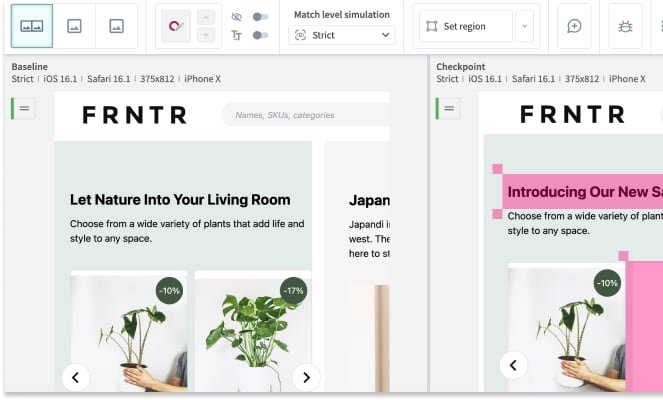
Eyes for visual and functional testing
Automate visual and functional testing for web and mobile applications, with tests running in parallel across browsers and devices.

Applitools is an AI test automation platform for validating web, mobile, desktop, component, and document experiences across the product lifecycle.
Applitools is an AI test automation platform built to keep quality signals reliable as software changes faster and release cycles compress. The site positions it as deterministic AI by design: the same input should produce the same output, with bounded behavior and enforceable correctness instead of probabilistic drift.
The platform is organized around validating digital experiences across the product lifecycle, from design through development, testing, release, and monitoring. It supports teams that need to test UI components, websites, web applications, native mobile apps, desktop applications, PDFs, and other documents without relying on brittle locators alone.
Automate visual and functional testing for web and mobile applications, with tests running in parallel across browsers and devices.
Create, execute, and analyze functional, visual, and API tests with autonomous test creation, AI-augmented recording, and NLP authoring.
Validate UI components, websites, web applications, native mobile apps, desktop apps, PDFs, and documents with Visual AI.
Use Visual AI for functional, visual, and accessibility checks, including WCAG-related color contrast testing and UI layout validation.
Reduce cross-browser effort with a grid that recreates user interfaces across a wide range of browsers and devices.
Integrate with development workflows through more than 60 integrations, plus support for test frameworks, SCMs, CI/CD tools, bug tracking tools, and chat tools.
Validate UI components in Storybook or similar frameworks so teams can catch layout or state issues earlier in the development cycle.
Test websites and web applications, including marketing sites and SaaS products, with visual and functional validation across browsers.
Check native mobile apps on iOS or Android devices, as well as desktop applications built with Electron or similar technologies.
Verify PDFs and documents such as legal files or invoices, where presentation and correctness matter as much as code behavior.
Run visual and functional checks inside CI/CD workflows so teams can detect regressions before release and keep cross-browser testing more consistent.
Applitools is an AI-powered end-to-end testing platform. Its FAQ describes the product as a way for teams to deliver visually flawless applications across browsers, devices, and screens.
The source says Applitools offers flexible pricing plans and that subscriptions include access to both Applitools Autonomous and Applitools Eyes, with Test Units allocated between them.
Applitools provides a free trial and documentation/tutorials to help teams get started. The FAQ also says users can explore Eyes, Autonomous, and Preflight.
The FAQ and product pages say Applitools integrates with CI/CD workflows and supports automated visual, functional, API, and accessibility testing.
Applitools supports web applications, mobile browsers, native mobile apps, desktop applications, PDFs, and documents, with visual validation across browsers and devices.
Traffic data is for reference only.

accelq.com
Cloud-based, AI-powered codeless test automation for web, API, mobile, desktop, backend, and packaged apps.
mabl.com
mabl is an agentic test automation platform for web, mobile, AI apps, and APIs, helping teams create, continuously run, recover, and analyze tests in existing workflows.

magicpod.com
AI-assisted, no-code test automation for web and mobile app QA teams.

quashbugs.com
Quash is a mobile app testing and QA automation platform for running plain-language test flows on real Android and iOS devices.

katalon.com
AI-assisted test automation and test management for software QA teams

rainforestqa.com
Rainforest QA is a no-code AI test automation platform helping SaaS teams create, maintain, and run end-to-end tests with less manual upkeep.