

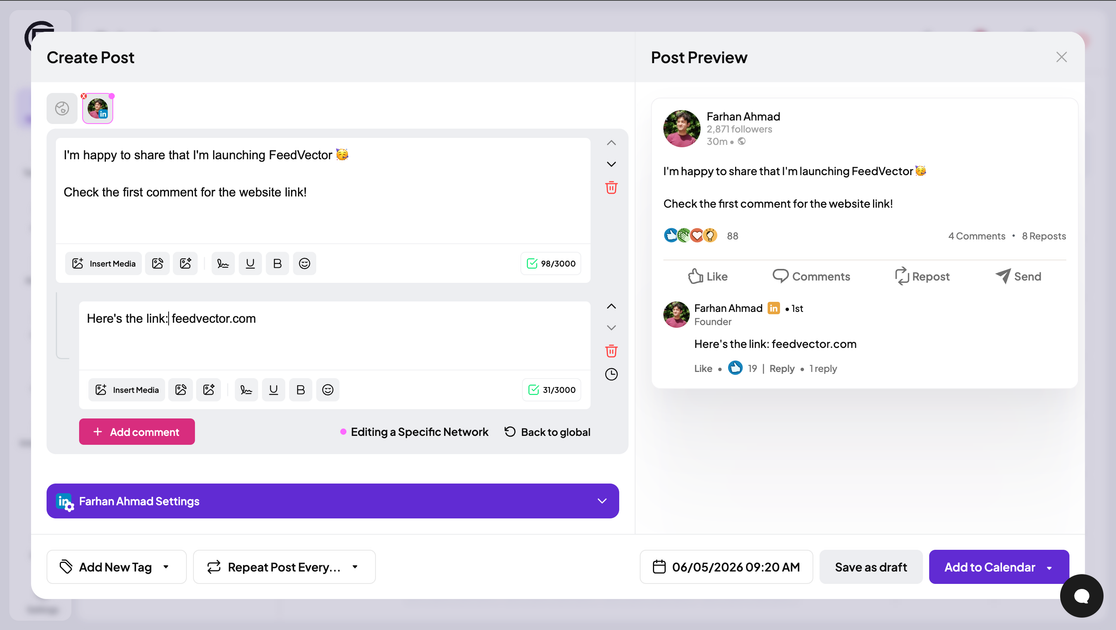
Draft LinkedIn posts
Generate and review LinkedIn post drafts from templates, repurposed ideas, or AI-assisted writing before publishing.
FeedVector is a LinkedIn content planning and publishing tool for creators and teams. It brings drafting, scheduling, commenting prompts, analytics, and automation into one workflow so users can manage their LinkedIn cadence from a single dashboard.
The product also supports AI-assisted workflows through an MCP server, which lets compatible clients such as Claude and Cursor interact with a FeedVector account to schedule posts and work with connected social accounts. The pricing page shows a 7-day trial followed by a paid Pro plan.
Generate and review LinkedIn post drafts from templates, repurposed ideas, or AI-assisted writing before publishing.
Use suggested templates and repurpose website pages, old posts, or profile context into new post ideas.
Plan and schedule posts from one dashboard, including repeated publishing tasks and workflow automation.
Find fresh LinkedIn posts to comment on every day to support audience growth through engagement.
Track analytics for LinkedIn content, including recommended topics, formats, hooks, posting times, and performance signals.
Connect AI clients through the MCP server and use tools such as account listing, schema lookup, and post scheduling.
Plan a week of LinkedIn posts from one dashboard, review drafts, and keep a visible posting cadence without moving between separate tools.
Turn pages, older posts, or profile context into new LinkedIn post ideas when you need a faster way to produce drafts.
Find posts to comment on each day to add thoughtful responses and support audience growth through engagement.
Use AI clients connected through MCP to schedule posts and manage connected accounts with tool-based commands.
Coordinate LinkedIn content across a team with approvals, shared access, and automated repeat publishing tasks.
FeedVector offers a 7-day trial. After that, you choose a paid plan to continue planning, creating, scheduling, and analyzing LinkedIn content.
The source shows a Pro plan at $29 per month after the trial. The pricing page also indicates the trial starts at $0.
The source says FeedVector helps with LinkedIn content planning, drafting, templates, repurposing, scheduling, analytics, commenting, and automation, and it also exposes an MCP server for AI clients such as Claude and Cursor.
The site says unlimited team members are included on the Pro plan, along with approval workflows for LinkedIn content.
FeedVector connects AI clients like Claude and Cursor through its MCP server so they can schedule posts using the FeedVector account and tools.
트래픽 데이터는 참고용으로만 확인하세요.