
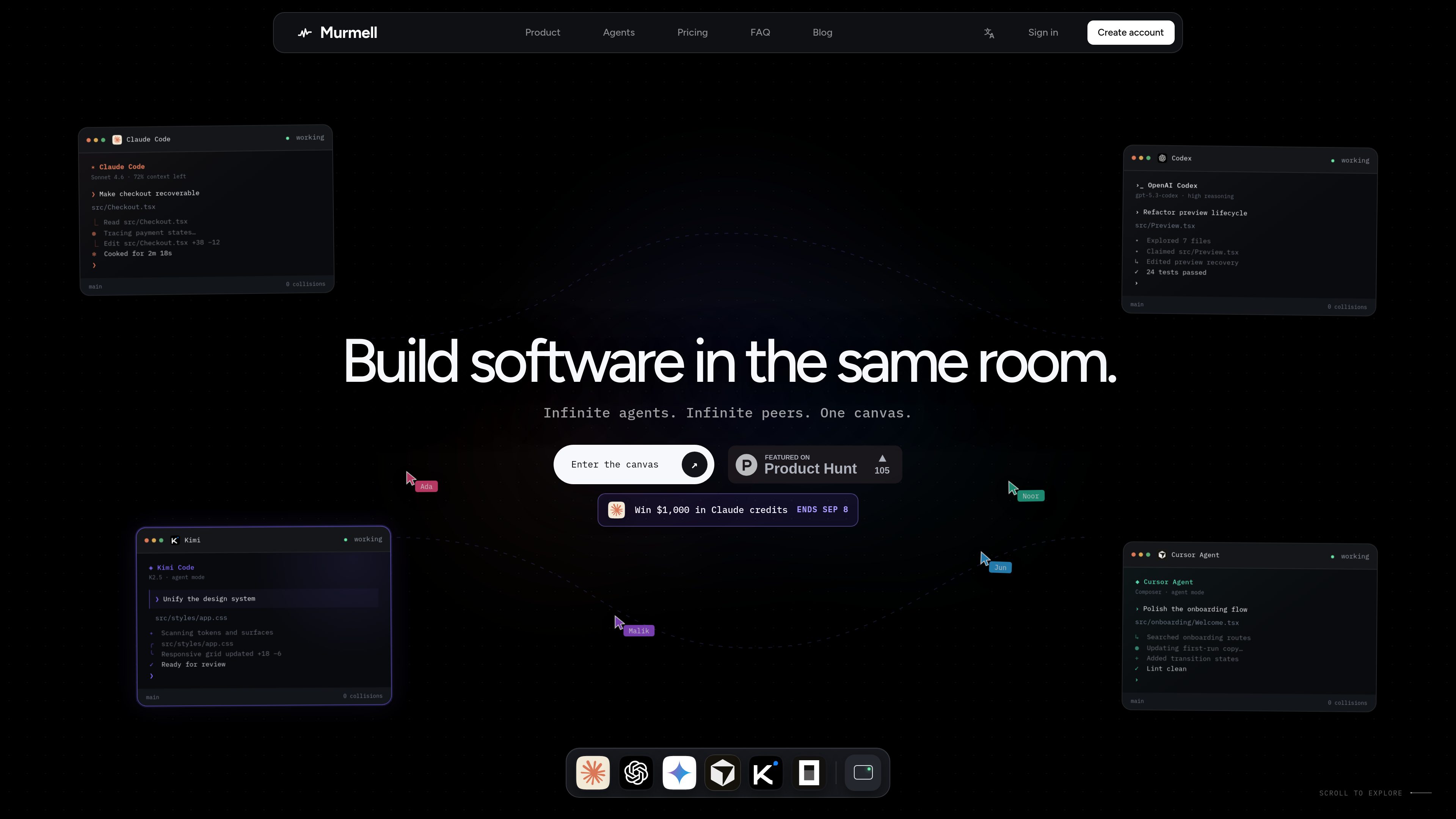
Multi-agent browser canvas
Open multiple coding agents in the same project and manage them from one shared canvas rather than separate local sessions.

Murmellは、共有クラウドサンドボックスでAIコーディングエージェントを実行するブラウザー上のキャンバスです。ローカル環境の設定やファイルの競合を避けながら、Claude Code、Codex、Kimi、OpenCodeを同じプロジェクトで連携できます。
Murmell is a browser-based canvas for running several AI coding agents on one shared project directory in the cloud. It is built around a live workspace where agents can work in parallel and other people on the link can watch the session as it happens.
The product’s core purpose is to make multi-agent coding safer and easier to coordinate. Murmell uses file reservations, shared terminals, and persistent cloud sandboxes so teams can avoid overlapping edits, keep a session in sync, and work without setting up the agents locally.
Open multiple coding agents in the same project and manage them from one shared canvas rather than separate local sessions.
Agents reserve file paths before editing, which helps prevent simultaneous writes to the same file.
Projects run on cloud machines managed by Murmell, so the workspace is not tied to one developer’s laptop.
Everyone with access to the canvas can see the same terminals, cursors, and live previews while work is underway.
The site names Claude Code, OpenAI Codex, Kimi, and OpenCode as supported agents, with more mentioned on the homepage.
Murmell publishes numbered guides for common tasks such as using Claude Code without local installation, splitting work across several agents, and sharing a session live.
Use Murmell when you want different agents to work on separate parts of the same repository at the same time, with reservations reducing the chance of file collisions.
The guides describe opening a real Claude Code terminal from the browser, which is useful when you want to use the agent without installing it locally.
Share a canvas link so another person can observe the same terminals, cursors, and previews without refreshing or replaying the session.
Use the persistent cloud sandbox when you want the workspace to live on Murmell’s machines rather than on a developer laptop.
The examples on the homepage show tasks like checkout recovery, preview refactoring, and design-system updates handled by separate agents in the same room.
The site explicitly names Claude Code, OpenAI Codex, Kimi, and OpenCode, and the homepage also says “and more.”
According to the site, agents run on dedicated cloud machines managed by Murmell, while the local machine is only used for the browser.
Murmell uses a reservation system: an agent claims the file paths it is about to edit before writing, so other agents wait until those paths are released.
Yes. The site says a canvas can be shared as a link and watched live, with no need to replay or refresh the session to stay in sync.
The site indicates Starter is free forever and mentions paid Pro and Builder plans, but the dedicated pricing page fetched for this review returned a 404, so the public pricing information is limited in the collected pages.
トラフィックデータは参考情報としてご利用ください。
tablo-cat.netlify.app
tabloは、画面の隅からClaude CodeとOpenAI Codexのセッションを見守る、デスクトップ用の猫ウィジェットです。コンテキスト使用量、権限リクエスト、通知、セッションごとのアクティビティをリアルタイムで確認できます。

skillsmp.com
SkillsMPは公開GitHubリポジトリからオープンソースのエージェントスキルを探せる無料マーケットプレイスです。検索、閲覧、REST API、MCPに対応し、Claude Code、Codex CLI、ChatGPTで利用できます。
blackflare.dev
BlackFlareはClaude CodeとCodex向けのmacOSメニューバーアプリです。アクティブなセッションをスリープさせず、完了時や入力が必要な際に通知し、使用量を表示。TelegramやSlackへの転送、設定ファイルを手編集せずにデフォルト変更も可能です。

evlat.kalaomer.com
Evlat is a quiet macOS status strip for monitoring Claude Code, Codex, and Antigravity sessions, plus long-running commands. It highlights sessions that need your response and shows activity from local or SSH-connected machines.