
One API for multiple harnesses
Integrate once and select the harness for each task. HarnessRouter presents a shared contract for Codex, Claude Code, and Hermes so teams can switch harnesses without rebuilding their backend integration.

HarnessRouterは、チームが自社インフラ上で単一のAPIを通じてCodex、Claude Code、Hermesを製品に接続できるエージェント向けバックエンドレイヤーです。エージェントのランタイムを自社で運用したくないチーム向けに、マネージドクラウドも用意されています。
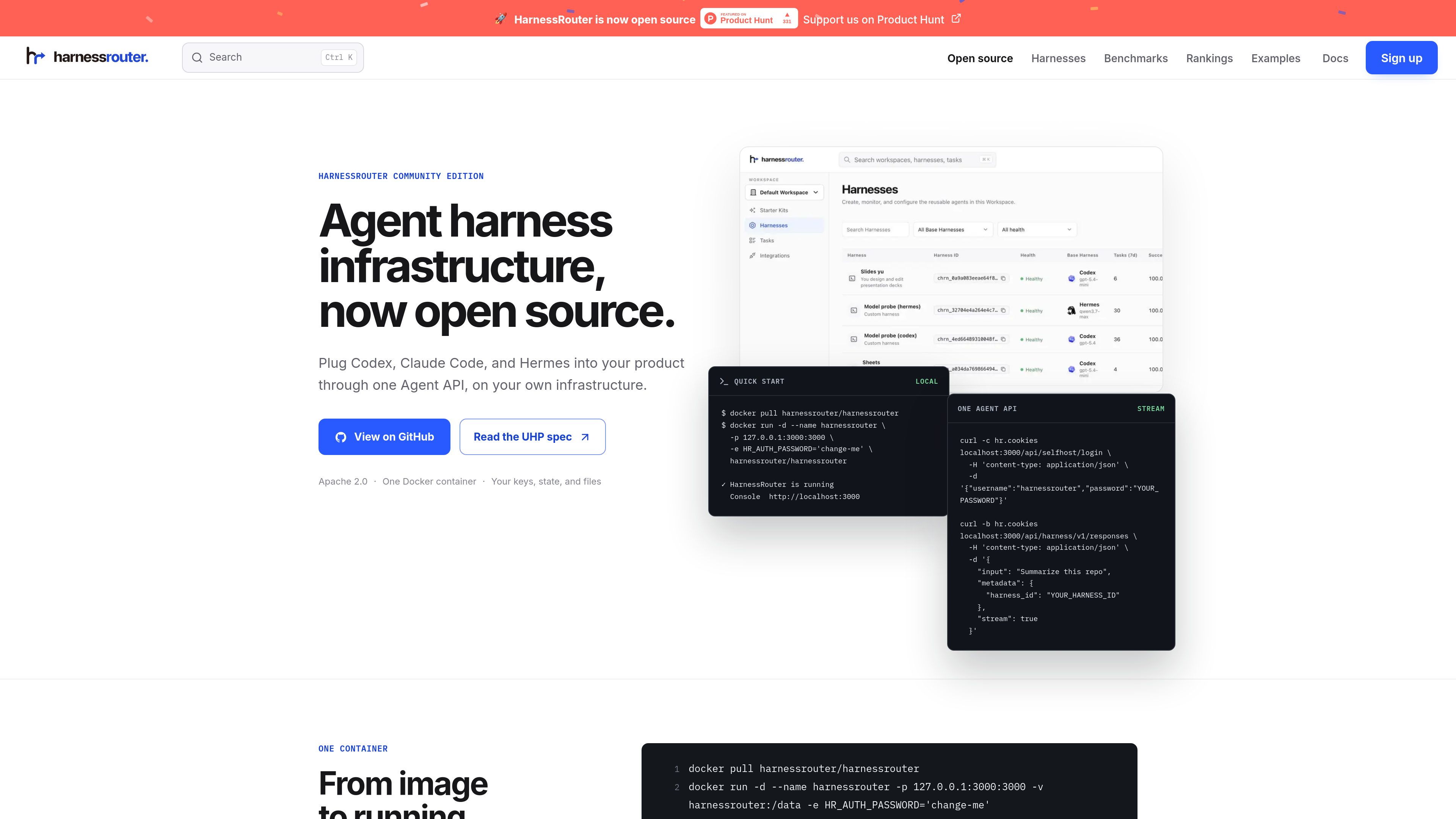
HarnessRouter is an agent infrastructure product for teams building AI features into software products. It provides one Agent API for running supported harnesses such as Codex, Claude Code, and Hermes, while keeping the product’s own UI, authentication, and data model in the customer’s application.
The open-source Community Edition runs on infrastructure you control and packages the Gateway, Runner, and Console in one Docker container. The same product line also includes HarnessRouter Cloud for teams that want the API without operating the backend themselves. The homepage and docs emphasize production agent workflows such as sessions, streaming, files, artifacts, cancellation, and structured failure handling.
The product is positioned as a backend layer for completed work rather than a simple model router. The docs and guides focus on product integration patterns, server-side authorization, multi-tenant behavior, and the workflow needed when users expect agents to return finished outputs instead of only model responses.
Integrate once and select the harness for each task. HarnessRouter presents a shared contract for Codex, Claude Code, and Hermes so teams can switch harnesses without rebuilding their backend integration.
The open-source edition runs in a single Docker container on infrastructure you control. The page says no managed database, external vault, or cloud account is required, and that the API, console, SQLite state, and workspace files stay on your own infrastructure.
The docs list sessions, response streaming, continuing a session, and canceling a session as core API capabilities. This supports long-running agent work where users need progress updates and the ability to resume or stop tasks.
HarnessRouter supports uploading files, persisting workspace files, and returning finished artifacts. That makes it suitable for product flows that need input documents, generated outputs, and downloadable results.
UHP is the public, versioned contract behind the platform. The homepage describes it as an open protocol with OpenAPI 3.1, JSON Schema 2020-12, versioned API definitions, and runnable checks that can be verified locally.
The Starter Kit provides complete examples that show how sessions, streaming, files, and finished work fit into real product experiences. The site also highlights a Cursor-style coding app, a family-care demo, and a Slides Kit production example.
Use HarnessRouter when your product needs to launch harnessed agents behind the scenes while keeping the product UI and user experience in your own app. The docs and examples frame it as a server-side agent backend layer.
Use the session model for work that unfolds over time, such as coding tasks, document work, or other jobs that need streaming progress, follow-up actions, and later inspection.
Use the files and artifacts flow when users need to upload source material and receive generated outputs back from the agent. The homepage explicitly calls out workspace files and finished outputs as part of the lifecycle.
Use the Starter Kit when you want a concrete starting point instead of an empty repository. The site shows reference demos and production kits for teams that want to adapt an existing agent product pattern.
Use Community Edition if you want to control infrastructure yourself, or move to HarnessRouter Cloud if you want the same API without running the agent backend. The pricing page and homepage both present this split clearly.
No. The site presents Community Edition as the open-source, self-hosted option and also offers HarnessRouter Cloud for teams that want a fully managed service.
The homepage says Community Edition includes the Gateway, Runner, and Console in one container, along with local SQLite state and workspace files on infrastructure you control.
The public pages mention Codex, Claude Code, and Hermes as supported examples. The docs and guides also discuss how to run Claude Code and Hermes through an API.
The product is built for session-based agent work with streaming, file handling, artifacts, cancellation, and error handling. The examples page shows a Cursor-style coding workflow, and the Starter Kit includes other product patterns.
The pricing page says you can build and integrate for free, and that 500 launch credits are available for a limited time after adding a card. It also lists a Developer plan starting at $20 per month.
トラフィックデータは参考情報としてご利用ください。

dragoncode.codes
Claude Code、Codex、Gemini CLIを1つのアカウントでつなぐ企業向けAIコーディング中継基盤

conductor.build
Conductorは、Claude Code、Codex、Cursorエージェントを分離されたワークスペースで並列実行できるMacアプリです。タスクの委任、差分の確認、ローカルでのマージを効率化します。

oomol.com
OOMOLはGmail、GitHub、NotionをAIエージェントに接続し、Codex、Claude Code、Cursorで認証済みツールを再利用できます。無料・有料・従量課金に対応。

apps.mergeable.io
Diffsmithは、Claude Code、Cursor、Codex、CopilotなどのAIコーディングエージェントが作成したローカルのgit変更をレビューできる、macOSネイティブアプリです。インラインコメントを追加し、プロンプトまたはローカルMCPサーバー経由でエージェントに返せます。

1code.dev
1Codeはコーディングエージェント向けのオープンソース視覚クライアントです。Claude CodeとCodexを統合し、デスクトップ・Web、Gitレビューとマージ、クラウドサンドボックスでのバックグラウンド実行に対応します。

www.agentconnect.md
AgentConnectを使えば、Claude Code、Codex、Gemini CLIなどのACPエージェントをSlack、Telegram、Discord、GitHubに連携し、チームが普段から協業に使うチャンネルで仕事を任せられます。オープンソースでセルフホストに対応し、エージェントのワークフロー向けにロール、ツール、メモリ、設定可能なトリガーを備えています。