
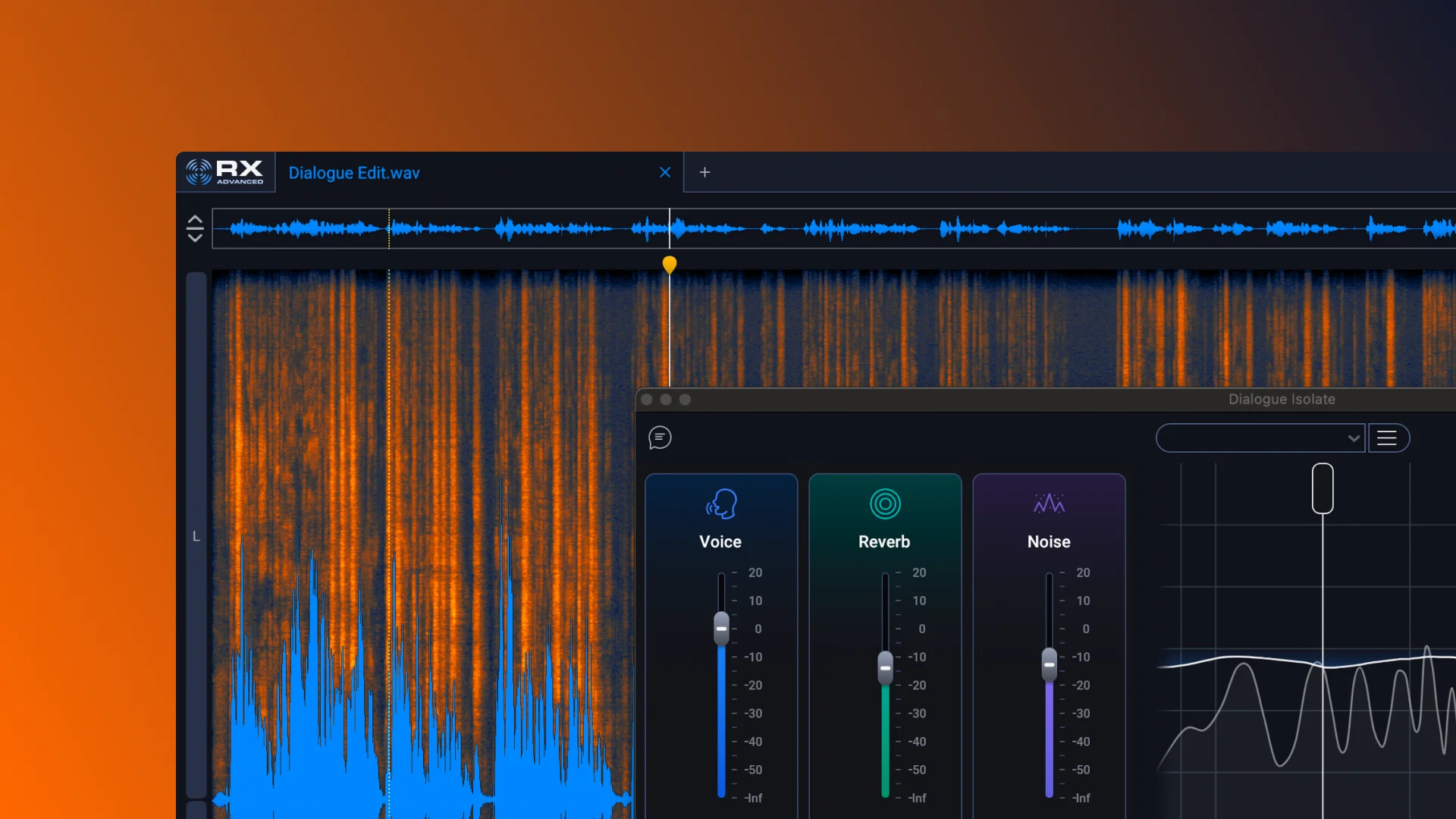
Spectral repair and visual editing
Use the Spectrogram to target individual unwanted sounds, such as dog barks, string squeaks, sirens, clicks, hum, rustles, and other recording flaws, rather than processing an entire file indiscriminately.

RX 12 Advanced is an audio restoration suite for repairing dialogue, music, effects, and other recordings. It helps post-production, music, and content creators remove unwanted sounds, rebalance material, and prepare audio for release.
RX 12 Advanced is iZotope's professional audio restoration suite for repairing and refining dialogue, music, effects, and other recordings. Its toolkit addresses unwanted sounds including clicks, clipping, hum, rustle, reverb, and background noise, combining spectral editing with specialized repair modules and machine-learning-assisted processing.
The product is built around targeted editing in the RX Spectrogram, where users can identify an unwanted sound visually and apply a repair to the relevant audio. It also supports broader post-production and release workflows through stem separation, dialogue and music adjustment, loudness optimization, and streaming checks.
Use the Spectrogram to target individual unwanted sounds, such as dog barks, string squeaks, sirens, clicks, hum, rustles, and other recording flaws, rather than processing an entire file indiscriminately.
Independently adjust dialogue, music, and effects in a post-production mix. The module is intended for situations where the balance needs correction or separate stems are unavailable.
Visually split audio into stems through Scene Rebalance, Music Rebalance, or Dialogue Isolate, then apply other RX tools to the separated material.
Analyze a recording for specific problems and propose repair settings that users can adjust, providing a faster starting point for common cleanup tasks.
Trim Silence helps manage long audio files, while Loudness Optimize supports perceived-loudness adjustments and Streaming Preview helps check how a release may translate to streaming playback.
RX 12 includes updated neural networks, rebuilt modules, a larger default Spectrogram, module search, and a resizable History panel for more direct editing and navigation.
Clean production dialogue, remove recording blemishes, and rebalance dialogue against music and effects when a scene mix needs adjustment or original stems are not available.
Separate vocals, bass, drums, or other musical material with Music Rebalance and apply focused repairs before creating edits, remixes, or revised mixes.
Improve the clarity of home or field recordings by addressing background noise and other common flaws before publishing spoken-word content.
Remove unwanted elements from field recordings and reshape repaired material for sound effects or other creative post-production uses.
Use Loudness Optimize, Streaming Preview, and Trim Silence when preparing cleaned or edited audio for delivery or release.
The product page lists tools for clicks, clipping, hum, rustles, reverb, background noise, and other unwanted sounds. Its Spectrogram supports targeted editing of specific noises such as dog barks, string squeaks, and sirens.
Yes. Scene Rebalance is designed to adjust dialogue, music, and effects when the balance needs correction and separate stems are unavailable. Stems View can then provide separated material for more focused RX processing.
Yes. The stated applications include music production, and Music Rebalance can separate elements such as vocals, bass, and drums for edits, remixes, and further repair.
The download page provides PC and Mac installers. After installation, RX Advanced can be loaded in host software and authorized with a serial number or run as a trial.
RX 12 Advanced operates in Trial mode for 10 days with export functionality disabled. After that period, it operates in Demo mode and inserts silence at regular intervals until it is authorized or validated with a paid serial number.

www.waves.com
Clarity Vx is an AI-powered audio plugin for removing background noise from vocals and voice recordings. It is designed for music, podcast, production, and video workflows where clean speech or singing is needed before mixing.

utell.ai
Utell AIは、リアルタイムの訛り変換、音声翻訳、会議音声のクリーニングで会話を明瞭にします。

xound.io
ノイズ除去や音程補正で音声を明瞭にするAI音声強化ツール

sanas.ai
多言語の会話を明瞭にするリアルタイム音声AI

audioenhancer.ai
音声・ノイズ・音量・エコー処理で音声と動画を整えるWebベースのAIツール。

krisp.ai
Krispは、会議や通話、コールセンター向けの音声AI製品です。ノイズキャンセリングに文字起こし、録音、要約、AIノート作成を組み合わせ、個人、チーム、コールセンター、開発者が、より明瞭な会話と自動化された会議記録を実現できるよう支援します。