
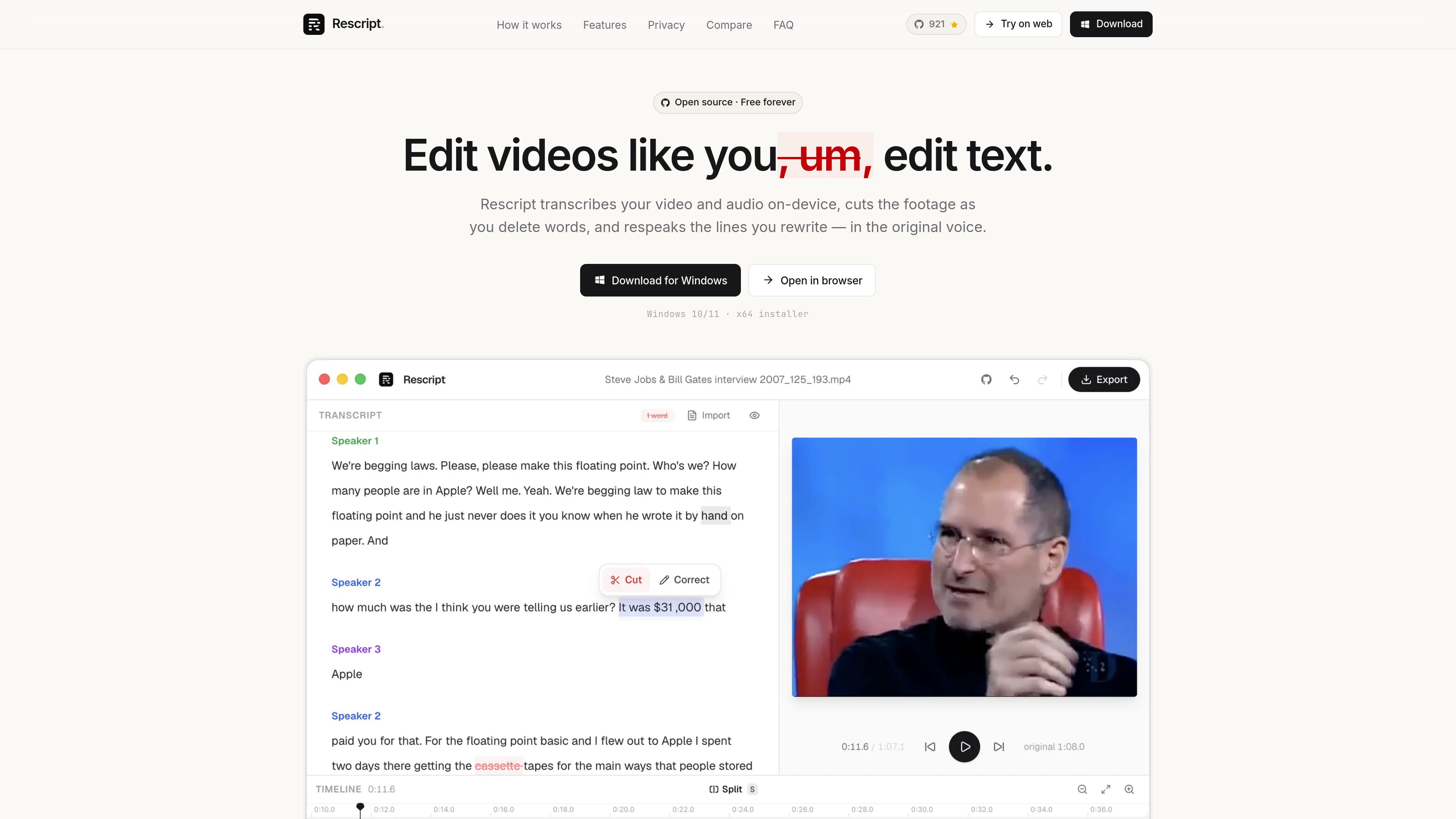
Word-level transcript editing
Delete a word or phrase to cut the exact span where it was spoken, with a live preview that skips removed sections.

Rescript is a transcript-based video and audio editor that cuts media as you edit its words. It runs in a browser or desktop app, with local transcription, voice regeneration, and export on your device.
Rescript is a transcript-based video and audio editor for speech-driven media. It transcribes a recording with word-level timestamps, then maps text edits to the underlying audio and video: deleting words removes the corresponding footage, while playback previews the cut as you work. Existing SRT, VTT, or JSON transcripts can also be imported instead of running transcription.
The workflow is designed for spoken recordings that need a quick rough cut or correction. Rescript can remove filler words and pauses, identify speakers locally, and provide a conventional timeline with waveforms, cut regions, and draggable timing handles for manual adjustments. Its Regenerate feature lets you rewrite a selected line and synthesize it in that speaker’s voice from clean audio already in the recording, with the generated speech fitted to the replaced span.
Transcription, editing, voice synthesis, and export run on the user’s device. The browser editor and desktop builds work without an account, and the Whisper model is downloaded once and cached. Exports include video, audio, transcripts, and subtitle files. Rescript is intended for transcript-led editing rather than full production work: the source specifically says it does not provide recording, multitrack editing, layers, transitions, titles, color tools, effects, noise removal, or burned-in caption styling.
Delete a word or phrase to cut the exact span where it was spoken, with a live preview that skips removed sections.
Remove “um” and “uh” occurrences in one pass, or cut pauses of 0.3 seconds or longer across the file.
On-device diarization groups transcript blocks by speaker, and speakers can be renamed for clearer multi-person edits.
Rewrite a fumbled sentence and synthesize it in the original speaker’s voice using clean reference audio from the recording. The result is fitted to the replaced time span.
Use the waveform, word bar, split and cut regions, draggable handles, zoom, pan, and timing adjustments when transcript edits need refinement.
Export video as MP4 or WebM up to 4K, audio as M4A, MP3, or WAV, transcripts as TXT or Markdown, and subtitles as SRT, VTT, or JSON.
Organize a multi-person interview with speaker labels, remove filler and pauses, and tighten answers by deleting text rather than repeatedly scrubbing the waveform.
Correct a wrong name, figure, or sentence without arranging a new take by rewriting the line and generating replacement speech in the speaker’s voice.
Turn a long talking-head or other speech-led recording into a tighter cut, then export the video or audio for further production elsewhere if needed.
Edit interviews, therapy sessions, legal recordings, or unreleased footage locally when sending source media to an online editor is unsuitable.
Import an existing caption file or export a cleaned transcript and subtitle file after editing the corresponding media.
No. Transcription, editing, voice generation, and export run locally. The Whisper model is downloaded once from Hugging Face and cached; after that, the product says it can work offline.
No. The full editor runs in a browser. Desktop builds are available for macOS, Windows, and Linux, including a Windows 10/11 x64 installer and Linux AppImage or .deb options.
The documented media inputs include MP4, MOV, MP3, WAV, and M4A. Existing SRT, VTT, or JSON transcripts can be imported. Browser use is recommended with a Chromium-based browser that supports SharedArrayBuffer; transcription uses WebGPU when available and falls back to WASM.
Rescript is free for noncommercial use under the PolyForm Noncommercial 1.0.0 license, with no account, trial, usage meter, or watermark stated in the source. Commercial use requires a paid license. The source also says optional server-based paid features may be added later.
No. It is focused on transcript-led editing of a single clip. The source lists no recording, multitrack editing, layers, transitions, titles, color, effects, noise removal, or burned-in caption styling, so a separate editor may be needed for those tasks.
トラフィックデータは参考情報としてご利用ください。

animatecaptions.com
TikTok、Reels、YouTube Shorts向けに短編動画へ自動字幕と1語ずつのアニメーションを追加。

wayin.ai
動画のクリップ、検索、要約、文字起こし、字幕、リフレームに対応するAI動画プラットフォーム

nevercap.ai
NeverCapは音声・動画を編集可能なテキストに変換するAI文字起こしツール。話者ラベル、タイムスタンプ、100以上の言語、複数ファイルの一括アップロードに対応し、月間分数制限もありません。

shootclip.com
ShootClipは、プロ向けのタイムラインツール、AI字幕、内蔵MCPサーバーを備えたmacOS用動画編集ソフトです。編集作業中にAIアシスタントが一緒に作業できます。
contentfries.com
ContentFriesは料金情報を公開していますが、製品機能は確認できません。

aivideocut.com
長尺動画をSNS向け短編に変換するWebベースAIエディター