OmniDICOM logo

OmniDICOM

Freemium
訪問

OmniDICOM is a desktop DICOM viewer for Mac and Windows that supports study review, MPR and 3D reconstruction, measurements, metadata editing, PACS/DICOMweb transfer, and export. Its Professional plan adds local CT denoising, filter chains, and quantitative analysis for research and education.

OmniDICOMとは?

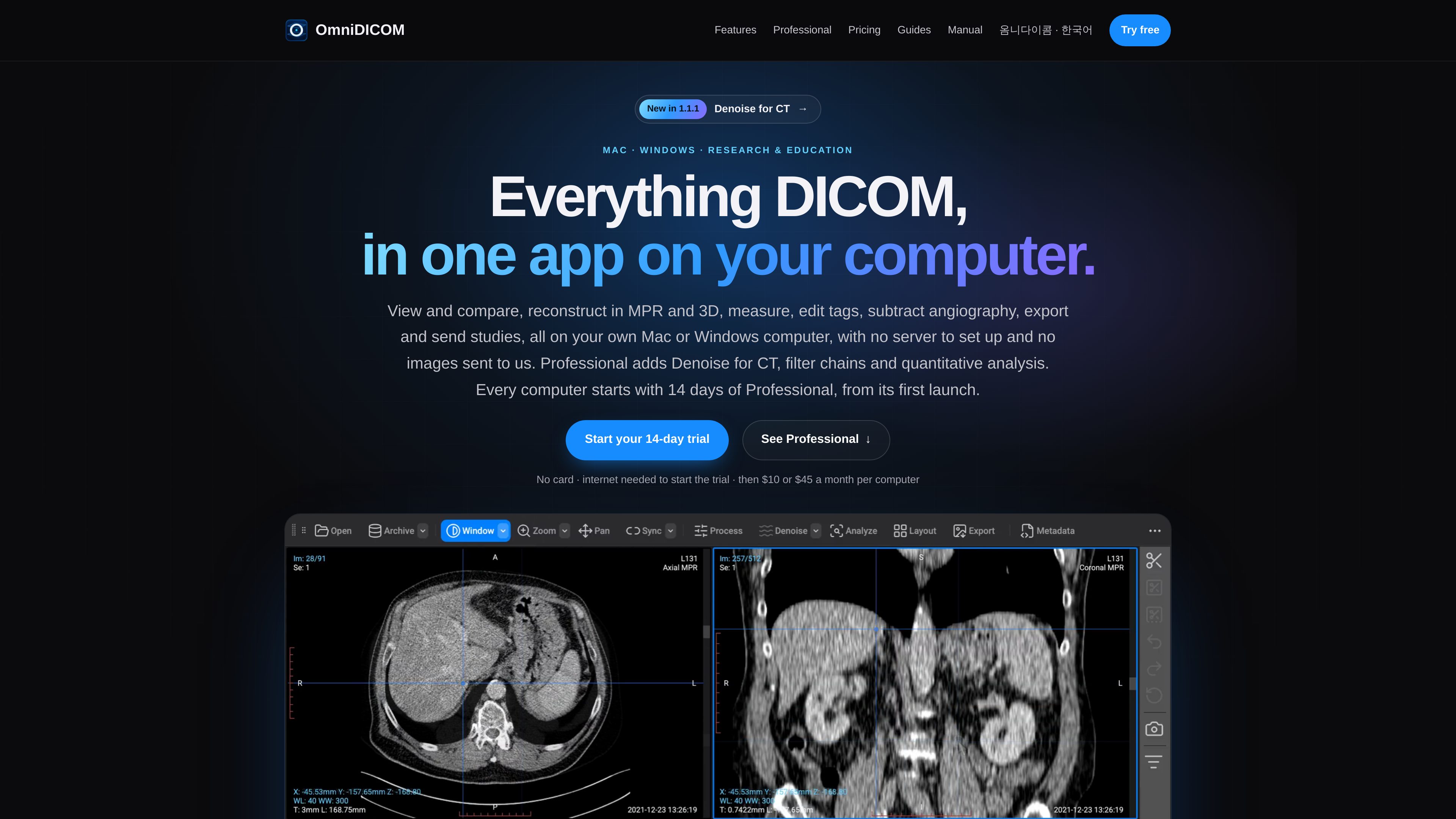
OmniDICOM is a desktop DICOM viewer for macOS and Windows, built for viewing, review, and secondary review of medical images in research and educational workflows. It works with local studies, including folders, DICOMDIR media, ZIP archives, and multi-frame studies, so users can inspect and compare series without setting up a separate server.

The viewer combines routine image navigation with MPR, MIP, 3D volume rendering, cine playback, measurements, metadata editing, angiographic subtraction, PACS/DICOMweb transfer, and image or movie export. Professional extends the viewer with local CT denoising, ordered filter chains, and quantitative analysis tools. OmniDICOM is for research and education only; it is not intended for diagnosis or clinical decision-making.

OmniDICOMでできること

DICOM viewing and comparison

Open local folders, files, ZIP archives, DICOM discs, DICOMDIR studies, and multi-frame studies. Compare series with window presets, zoom, pan, synchronized navigation, annotations, and cine playback with adjustable speed.

MPR, 3D, and fusion

Reconstruct suitable CT or MRI volumes across axial, coronal, and sagittal planes, then inspect them with MIP, volume rendering, scalpel controls, and PET/CT fusion overlays.

Metadata and measurement tools

Search DICOM tags by name or value, edit supported top-level values, and save changes across a series. Measure distances, angles, and regions, inspect ROI statistics, and manually calibrate studies without usable pixel spacing.

Angiography, PACS, and export

Review compatible angiographic runs with DSA mask subtraction and pixel-shift alignment. Connect to configured PACS or DICOMweb services, and export DICOM, PNG, JPEG, BMP, MP4, or WMV outputs.

Professional processing and analysis

Run CT denoising locally, build filter chains with up to eight filters, save presets for the series on the current computer, and use histograms, profiles, ROI tools, particle analysis, and time-intensity curves.

利用シーン

“Review CT and MRI volumes”

Open a local volume study, compare series, and use the MPR 2×2 layout to inspect axial, coronal, sagittal, and 3D views. Window and level controls, cross-reference navigation, and volume rendering support structured study review.

“Inspect angiography and cine studies”

Play multi-frame angiography or ultrasound sequences, control playback, and use compatible DSA tools to select a mask and adjust pixel alignment when reviewing subtraction workflows.

“Prepare research datasets”

Search and edit supported DICOM metadata values, save corrections across a series, and export selected images, complete series, or cine sequences for presentations and research materials. The site recommends working on a copy when preserving originals matters.

“Process and quantify CT images”

Professional users can apply local CT denoising, test ordered filters, compare processed and original views, and collect ROI statistics, histograms, profiles, or time-intensity curves for research analysis.

“Exchange studies with research infrastructure”

Use configured PACS or DICOMweb connections to find, retrieve, send, and receive studies through supported C-FIND, C-MOVE, C-GET, C-STORE, QIDO-RS, and WADO-RS workflows.

よくある質問

Is OmniDICOM intended for clinical diagnosis?

No. The product is intended for viewing, review, and secondary review in research and education. It is not a medical device and is not intended for diagnosis, primary interpretation, or clinical decision-making.

What operating systems and hardware are supported?

The site provides a separate 64-bit Windows 10/11 installer. The current Mac download information specifies Apple silicon Macs running macOS 13 or later; Intel Macs are not supported by that installer. Professional CT denoising on Mac requires macOS 14 or later.

Does local viewing upload my DICOM studies?

The site states that images are not uploaded to OmniDICOM for local viewing. An internet connection is needed to start the trial and for licensing and update services, while PACS transfers use the servers configured by the user.

What is included in Basic versus Professional?

Basic includes the complete viewer, including MPR, 3D, cine playback, measurements, metadata editing, PACS/DICOMweb transfer, and export. Professional includes Basic plus local CT denoising, the Process workspace, filter chains, and Analyze tools. Every computer starts with a 14-day Professional trial from first launch.

Can edited metadata and processed images be saved?

Supported metadata edits can be saved across the selected series. Professional processing can be applied for display or saved for the series on that computer; denoising does not change the original DICOM files. The site recommends using a copy when preserving originals is important.

クイック情報

Category
DICOM viewer and medical-image research software
Platforms
macOS and Windows
Primary use
Research and education; viewing, review, and secondary review
Trial
14-day Professional trial from first launch; no card required to start
Licensing
Basic and Professional plans licensed per machine
Local processing
Professional CT denoising and filter processing run on the user's computer

OmniDICOMの代替品

Icon logo

Icon

icon.com

Iconは、人によるUGC広告サービス兼クリエイティブ運用製品です。クリエイターの募集、台本作成、発送、コーチング、編集まで担いながら、編集済み広告を6本制作します。競合調査、素材の再利用、分析、広告出稿に対応するAdmaker 2.0も搭載しています。

Positional logo

Positional

positional.com

コンテンツとSEOの計画・最適化・分析・追跡を一元化

Dishylink logo

Dishylink

dishylink.com

Dishylink is an unofficial Starlink monitoring app for macOS, Windows, and supported browsers. It reads local Starlink telemetry and network data to help users inspect connection health, connected devices, usage, power draw, outages, and satellite visibility.