Nim Video logo

Nim Video

Freemium
訪問

プロンプトや画像、映像素材から編集可能な動画・画像を作るWebベースのAIプラットフォーム

Nim Videoとは?

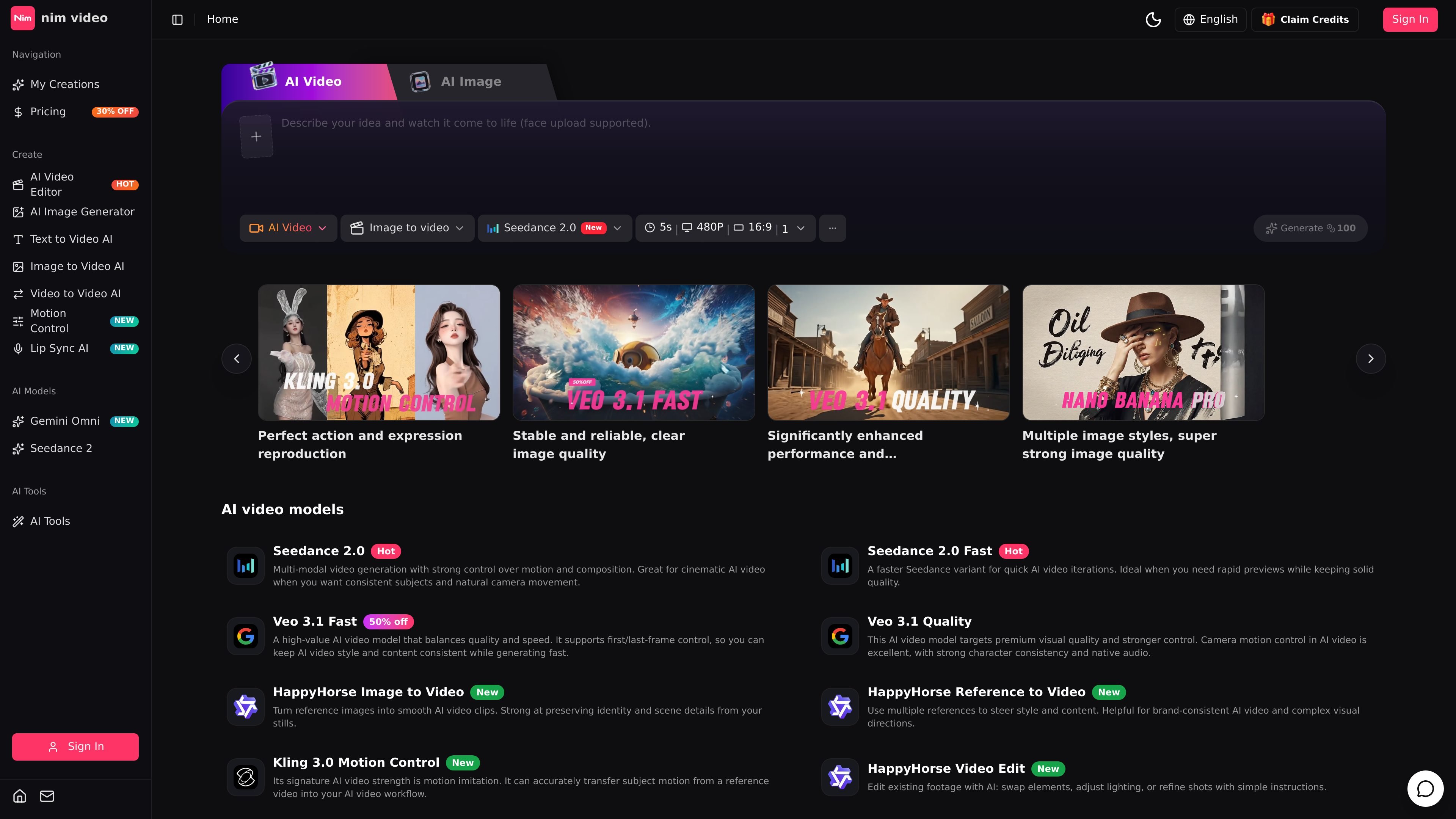
Nim Video is an AI video and image creation platform that combines prompt-based generation, reference-driven workflows, and prompt editing in one studio workspace. The site presents it as a place to move from idea to output across text-to-video, image-to-video, video editing, and image generation without switching products.

Its video side includes multiple model options and workflows such as text-to-video, image-to-video, video-to-video, reference-to-video, video extend, motion control, and lip sync on supported plans. The image side includes text-to-image and image-to-image generation with models such as GPT Image 2, Nano Banana, Nano Banana Pro, and FLUX. Pricing is subscription-based, with a free tier for trying the product and paid plans that add more credits, higher output tiers, and commercial options.

Nim Videoでできること

Multiple video generation workflows

Generate AI videos from text prompts, still images, reference images, or existing video footage. The site highlights several video models and workflows, including text-to-video, image-to-video, video-to-video, reference-to-video, and video editing.

Prompt-based video editing

Edit uploaded clips with prompt instructions instead of rebuilding the scene manually. The video editor page shows options to change the environment, replace people, change age or weather, remove distractions, and adjust the look of footage.

AI image generation and editing

Create still images from text prompts or reference images using AI image models such as GPT Image 2, Nano Banana, Nano Banana Pro, and FLUX. The image generator page also supports image-to-image workflows and output prompts for different compositions and aspect ratios.

Output and control options

Use models and controls that vary by workflow, including aspect ratio, duration, resolution, audio generation, and quality mode on supported plans. The pricing page also shows motion control and lip sync features at different tiers.

Unified studio workspace

Work from a single dark studio-style workspace that brings video and image creation together. The home page emphasizes moving from prompt to reference, generation, editing, and reuse without leaving the product.

Plan-based output limits

Save and download outputs, with higher plans adding private generation, no-watermark video downloads, and higher-resolution upgrades. The pricing page separates these capabilities by plan rather than making them universally available.

利用シーン

“Text-to-video creation”

Turn prompts into short AI video clips when you need a fast starting point for concept tests, social posts, or visual experiments.

“Image-to-video workflows”

Upload a still image or reference set and generate motion while trying to preserve the original subject, style, or scene details.

“Prompt-based video revisions”

Edit an existing clip with instructions such as changing the environment, swapping people, adjusting appearance, or removing objects.

“AI image production”

Create campaign visuals, social graphics, posters, or product images from text prompts or source images using the image generator.

“Production-oriented output preparation”

Move from draft assets to exportable outputs with plan-based controls like higher resolutions, no-watermark downloads, and private generation.

よくある質問

What is Nim Video?

Nim Video is a browser-based AI video and image creation workspace. The site presents it as a studio for generating videos and images from prompts, reference media, and editing instructions.

What can I do with Nim Video?

The site shows text-to-video, image-to-video, video-to-video, video extend, AI image generation, and prompt-based video editing workflows. It also highlights motion control, lip sync, and reference-driven generation on higher plans.

Is Nim Video free or paid?

The pricing page includes a free plan with one-time credits, plus Basic, Pro, and Business subscription plans. Paid plans add more credits, faster queues, higher-resolution output options, private generation, and commercial rights on the Business plan.

Can I use my own images or videos as input?

Nim Video can be used in the same workspace for AI video and AI image tasks, and the home page frames it as a single studio for moving from prompt to reference, generation, editing, and reuse. The site also supports uploading reference images or source video for certain workflows.

Is Nim Video suitable for team or commercial use?

The source pages show support for team-oriented and commercial workflows on higher tiers, including priority queues, dedicated support, and commercial rights. The pages do not spell out collaboration features such as shared workspaces or multi-seat management.

クイック情報

Category
AI video and image creation platform
Platform
Web-based
Primary workflows
Text-to-video, image-to-video, video editing, image generation
Pricing shape
Free tier plus paid subscription plans
Source domain
nimvideo.com
Notable controls
Motion control, lip sync, aspect ratio, duration, resolution

Nim Video のトラフィック分析

トラフィックデータは参考情報としてご利用ください。

月間訪問数
210
世界ランキング
#15,572,921
直帰率
31.8%
平均滞在時間
00:00
訪問あたりのページ数
1.02
ドメイン評価
26

トラフィック推移

トラフィックソース

トラフィック分析データはまだありません。

主な地域

トラフィック分析データはまだありません。

Nim Videoの代替品

PixelPrompt logo

PixelPrompt

pixelprompt.app

プロンプト最適化、画像・動画生成、ECビジュアル、広告、UGC向けのブラウザAIワークスペース

CoCoClip.AI logo

CoCoClip.AI

cococlip.ai

短尺ソーシャル動画を作成するAI動画編集ツール

Podfy.ai logo

Podfy.ai

podfyai.com

テキストや音声、音楽を短編動画に変えるブラウザ型AI動画ツール。

Pika logo

Pika

pika.art

Pikaは、プロンプトや画像、既存映像から短編動画を作成・編集できるAI動画プラットフォームです。

HiDream.ai logo

HiDream.ai

hidreamai.com

プロンプト・画像・音声からAI画像と動画を生成

Lummi logo

Lummi

lummi.ai

写真、3D素材、短編動画を探せる無料AIストックメディア