
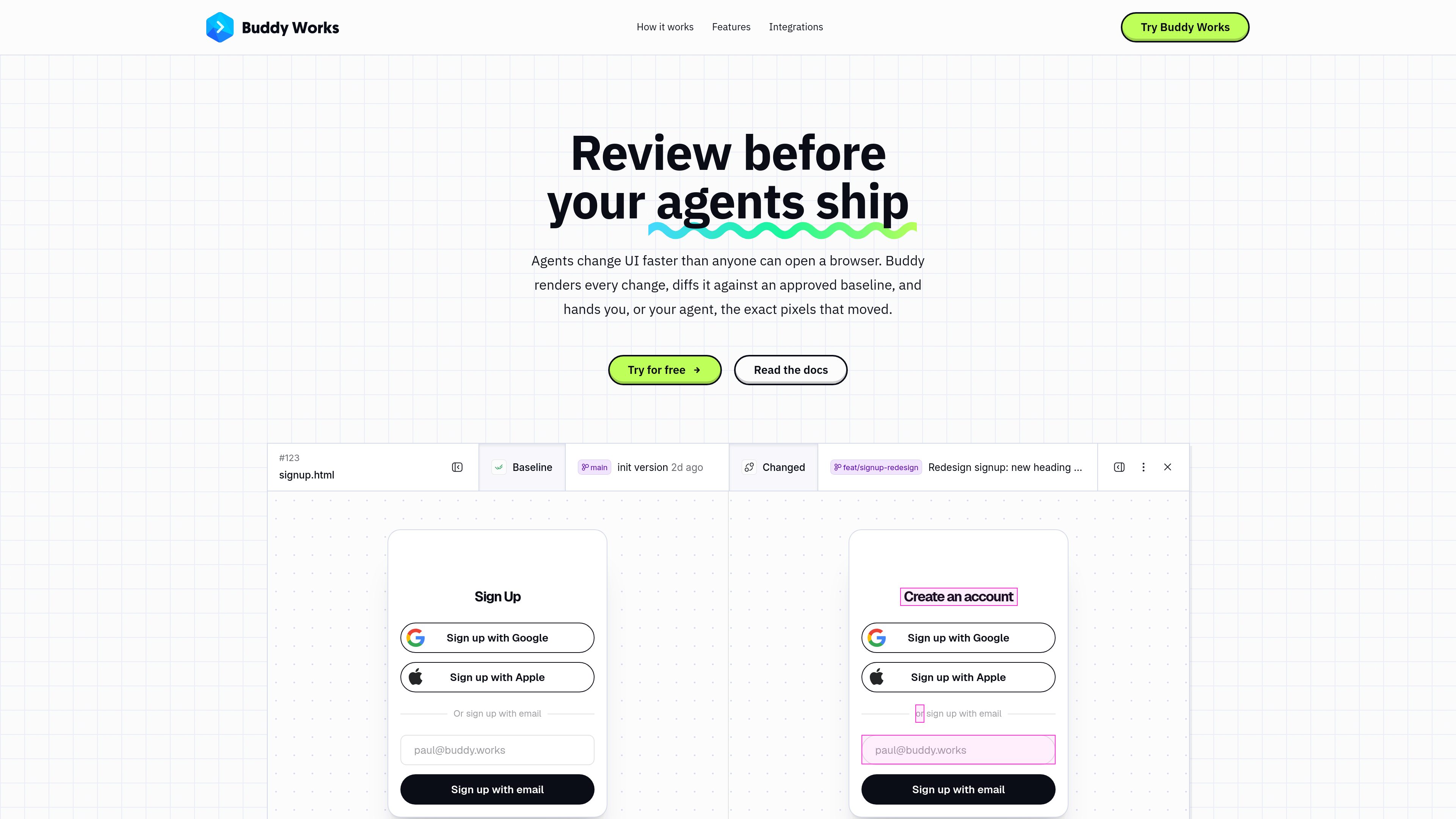
Rendered-pixel comparisons
Captures the UI as rendered in a browser and shows baseline and current images with differences outlined, helping surface layout movement, style changes, missing elements, and responsive issues.

Buddy Visual Tests is a visual regression testing feature for capturing rendered UI, comparing it with approved baselines, and reviewing changes in CI/CD workflows. It supports scriptless URL captures, existing E2E test runs, and Storybook builds.
Buddy Visual Tests is a visual regression testing feature that captures rendered web UI and compares each snapshot with an approved baseline. It focuses on the browser output rather than the underlying code, helping identify layout shifts, style drift, missing elements, and responsive breakage that functional assertions may not reveal.
Tests are organized into suites, which define what to render and how comparisons are made. Each run creates a session containing its snapshots. Reviewers can inspect highlighted differences and approve or reject changes; approved snapshots become the reference for later sessions. The feature can be used for scriptless URL or sitemap captures, existing E2E tests, and Storybook builds, and can be placed in CI/CD as a review gate.
Visual Tests is currently in Preview. The product page states that it runs inside Buddy CI/CD, GitHub Actions, or locally, and that it is free while in Preview.
Captures the UI as rendered in a browser and shows baseline and current images with differences outlined, helping surface layout movement, style changes, missing elements, and responsive issues.
Capture pages from a URL or sitemap without adding a test suite, or connect Playwright, Cypress, Selenium, or Puppeteer runs. Storybook has a dedicated action.
Suites can define browsers, systems, and device resolutions. Each variant resolves its own baseline, so a mobile-specific change is compared independently from desktop output.
Each branch can compare against its own approved baseline. Sessions retain the snapshots from a run, and approved changes become the reference for subsequent comparisons.
Reviewers can approve or reject visual changes, while the Approve Visual Tests Session action pauses a Buddy pipeline until the review is complete. Rejected changes stop the pipeline.
Suite settings can provide request headers, cookies, or local-storage values for pages behind login. Diff thresholds and CSS or XPath selectors can exclude intentionally changing regions from comparison.
Run visual checks on each change and give reviewers a pixel-level diff before the change is merged or deployed, providing a common checkpoint for human- and agent-written updates.
Point the CLI at a URL or sitemap to capture pages that may not have conventional end-to-end assertions, such as pricing, signup, or other public-facing views.
Capture the staging application in a Buddy pipeline, add the approval action, and allow production deployment to proceed only after the visual session has been reviewed.
Run Storybook or browser-based checks across configured browsers and device resolutions to detect changes that appear only on mobile, tablet, or a particular browser.
Supply suitable test authentication data through headers, cookies, or local storage, or let an E2E test establish the login state before snapshots are taken.
Not always. Scriptless testing can capture a URL or sitemap through the Buddy CLI. You can also wrap an existing Playwright, Cypress, Selenium, or Puppeteer run, or use the dedicated Storybook workflow.
Each run creates a session containing its snapshots. When changes are found, the baseline and current render are shown with differences highlighted. A reviewer can approve the changes, making them the new reference, or reject them.
Yes. In Buddy Pipelines, add the Approve Visual Tests Session action after the action that creates the session. The pipeline waits for review; approval allows it to continue, while rejection stops it.
Suite settings support request headers, cookies, and local-storage values, optionally scoped per snapshot. For E2E sessions, the test can log in and the capture uses the browser state when the snapshot is taken. Dedicated test credentials with minimal permissions are recommended.
The product documentation and page identify Visual Tests as currently in Preview. The product page says it is free while in Preview; availability and pricing may change after Preview.
トラフィックデータは参考情報としてご利用ください。

encore.cloud
Encore は、TypeScript または Go で本番バックエンドを構築するチーム向けのバックエンドインフラ基盤です。各自の AWS または GCP アカウントにリソースをプロビジョニングし、ローカル開発、プレビュー環境、AI 支援ワークフローに対応します。

mysetup.ai
mysetup.ai is a community directory for discovering how people use AI tools, agents, and workflows. Users can publish their own setup, follow changes from others, and consume community updates through web pages or feeds.