
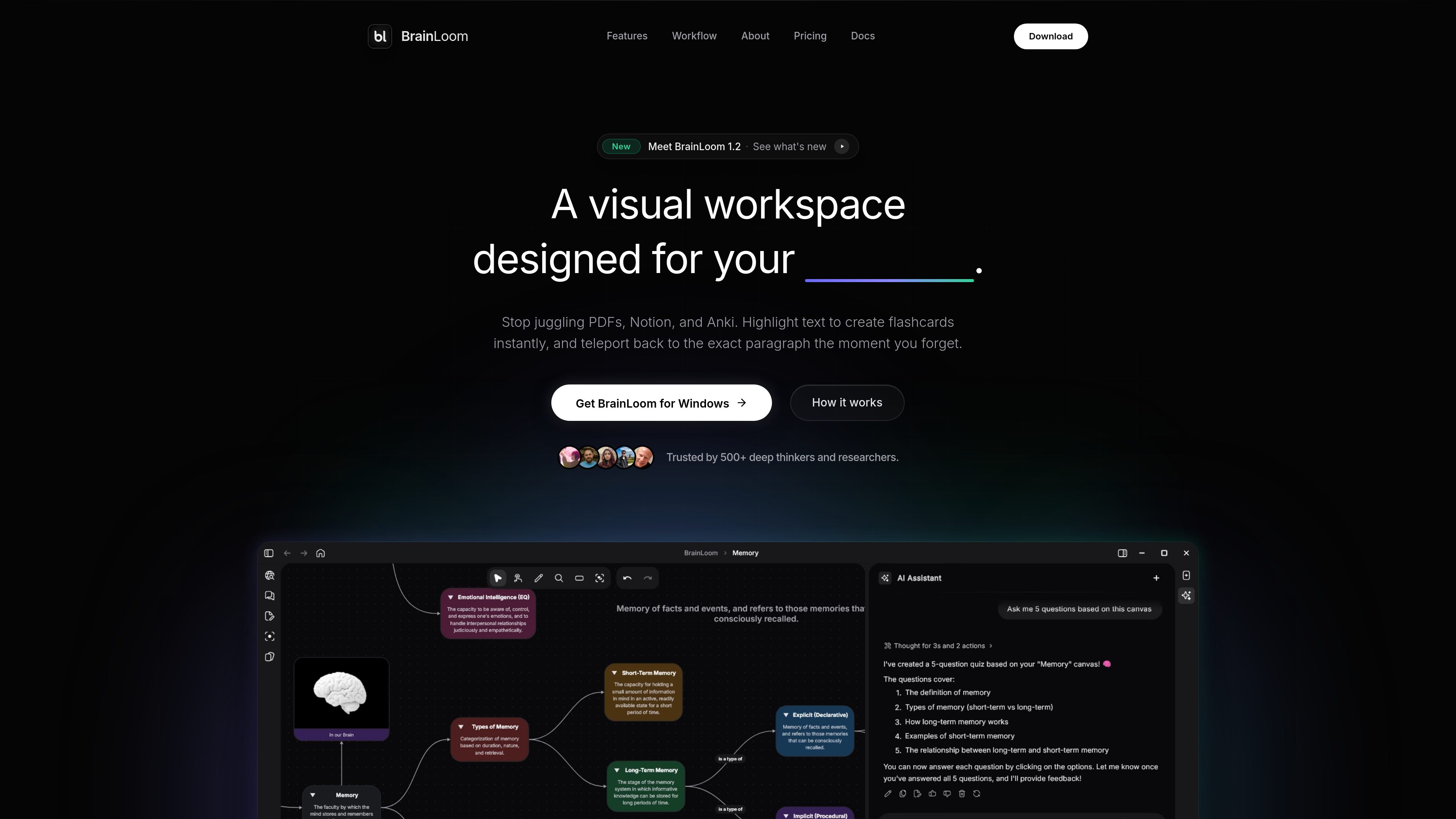
Source-linked flashcards
FlashLoom converts a PDF highlight into a flashcard and keeps the card linked to its original source. A later review can jump back to the exact paragraph that supplied the card.

BrainLoom is a local-first learning workspace that combines PDF annotation, linked flashcards, FSRS v6 spaced repetition, notes, and visual canvases. It is designed for learners and researchers who want to capture source context, review material, and organize connected ideas in one application.
BrainLoom is a local-first learning workspace and second brain for reading, note-taking, active recall, and visual knowledge organization. It combines PDF and document annotation, source-linked flashcards, FSRS v6 spaced repetition, notes, and an infinite canvas in one application.
The product's central workflow is preserving context while studying: users can highlight text in a PDF, turn the highlight into a flashcard, and later return directly to the original paragraph. Review tools include swipe-based memory grading, retention forecasts, forgetting-curve views, daily streaks, and 14 study and recall charts.
BrainLoom also supports spatial organization. Flashcard decks, notes, and nodes can be arranged on an infinite canvas, connected, or annotated with freehand and stylus input. A Mastery Lifecycle tracks topics from Idea through In Progress to Mastered. Storage is local-first, while encrypted cloud sync is available in plans that include it.
FlashLoom converts a PDF highlight into a flashcard and keeps the card linked to its original source. A later review can jump back to the exact paragraph that supplied the card.
The review system uses the FSRS v6 algorithm and swipe-based memory grading to schedule recall practice. Retention forecasts, forgetting-curve views, streaks, and 14 study and recall charts help users monitor review activity.
Users can place flashcard decks, notes, and nodes on an open canvas, connect ideas, and annotate with freehand drawing or a stylus. The canvas is intended for arranging related material spatially rather than only in a linear note structure.
BrainLoom can detect labels on anatomy charts and maps to help generate image-occlusion flashcards. The pricing information also lists local AI options through Ollama, LM Studio, or a bring-your-own-key setup.
The Mastery Lifecycle presents topics through stages such as Idea, In Progress, and Mastered, while the included analytics charts provide additional views of study and recall progress.
The application is designed for local-first, offline use. Encrypted cloud sync is offered on Pro and is described as syncing changes across supported devices when a connection is available.
Highlight important passages while reading, create recall cards from those highlights, and return to the original text when a question needs more context.
Arrange notes, flashcard decks, and idea nodes on the infinite canvas to see relationships between topics, then connect or annotate them with a stylus or freehand marks.
Use FSRS v6 scheduling and swipe-based grading for recurring review, with retention forecasts, forgetting-curve views, streaks, and study charts to inspect progress.
Use AI-assisted label detection and image-occlusion cards to practice anatomy charts, maps, and other visual material where recall depends on identifying parts of an image.
A flashcard created from a PDF highlight remains linked to that source. When reviewing it later, users can navigate back to the original highlighted paragraph.
Yes. BrainLoom is described as local-first and supports offline use. Cloud synchronization is a separate capability available with the Pro plan; changes sync when the device reconnects.
BrainLoom uses the FSRS v6 spaced-repetition algorithm. Its review interface includes swipe-based memory grading and study and recall analytics.
The pricing page lists Ollama, LM Studio, and bring-your-own-key (BYOK) model access. Local AI chat is included in the free plan, with AI workspace actions and vault-aware retrieval varying by plan.
The site lists native applications for macOS, Windows, Linux, iOS, and Android. The free plan specifically lists native macOS, Windows, and Linux builds, while cross-device cloud sync is available on the Pro plan.
トラフィックデータは参考情報としてご利用ください。

techsmith.com
TechSmithは、視覚的な説明や研修、ドキュメント、製品デモ向けの画面キャプチャ・録画ソフトを提供します。

deeplearning.ai
Online AI and machine learning courses for learners, developers, and teams.

cvat.ai
画像・動画・3Dデータを扱うコンピュータビジョンチーム向けのデータアノテーションプラットフォーム。手動およびAI支援ラベリング、品質レビュー、共同作業、モデル学習用データセットのエクスポートに対応します。

zentrik.ai
Zentrik Loopsは、通話やチケットで得た顧客の根拠を、製品の意思決定から提供、学習までつなぐ製品ワークフロープラットフォームです。ワークスペース単位のプランがあり、14日間のトライアルで評価できます。
lumiko.dev
Lumiko is a Chrome screen recorder for tutorials, product demos, and software walkthroughs. It combines cursor-following zoom, webcam overlays, privacy blur, browser-based editing, and local video export.