
Context-aware drafting
Generate replies, messages, and posts from visible LinkedIn or X conversations, public post context, or a rough idea, then refine the suggested copy before using it.

Zextri is a relationship-intelligence tool for professionals who write and maintain connections on LinkedIn and X. It combines context-aware drafting, contact memory, and relationship follow-up signals while leaving publishing decisions to the user.
Zextri is a relationship-intelligence tool for professional interactions on LinkedIn and X. It helps users draft replies, direct messages, and posts using visible conversation or public post context, while also retaining relationship context from interactions over time.
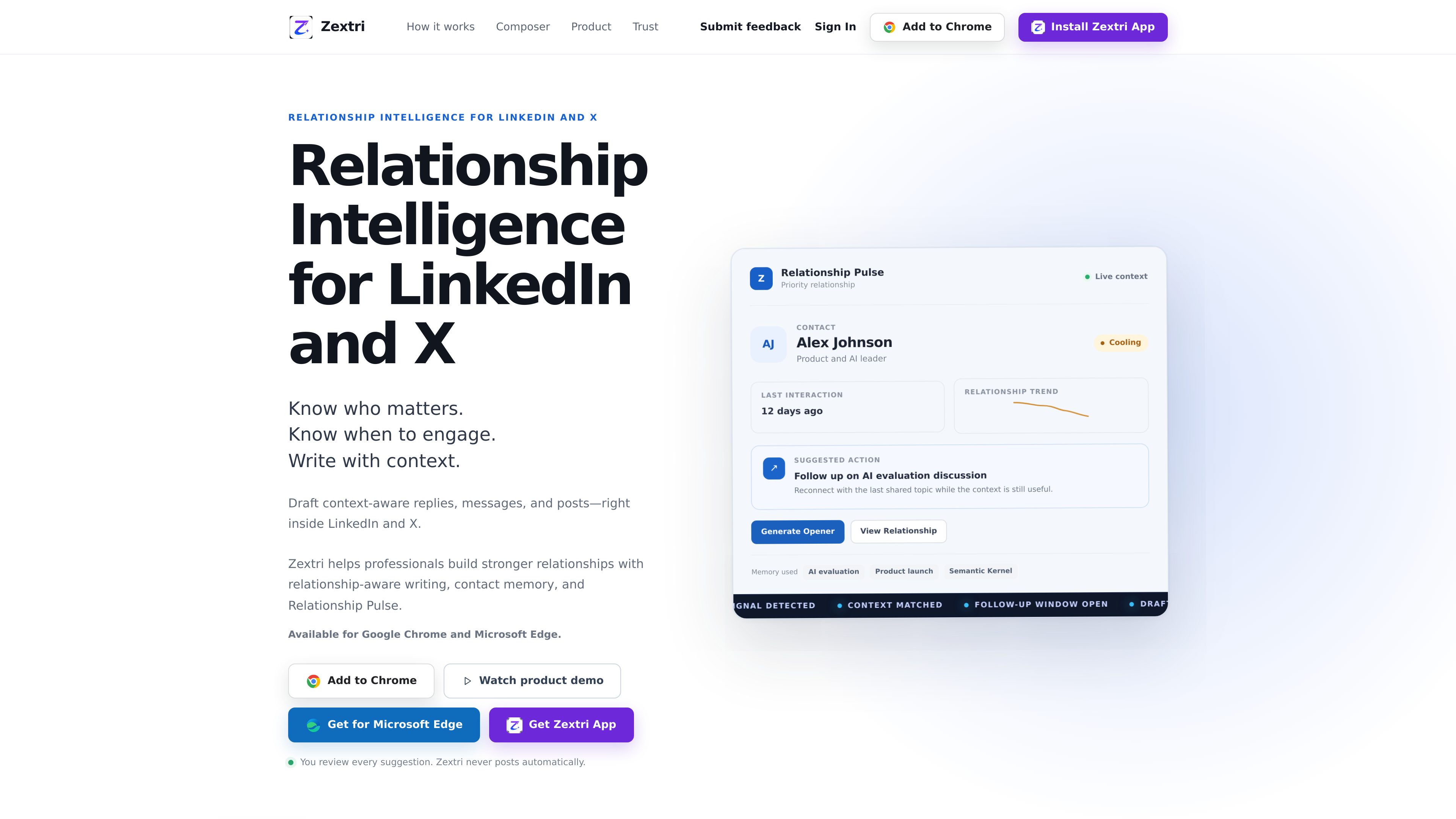
Its core workflow combines a composer with Relationship Memory and Relationship Pulse. Relationship Memory records shared topics and interaction history, while Relationship Pulse identifies contacts that may need attention, shows relationship states such as cooling or warming, and can suggest a useful next action or opener.
Users can work inside LinkedIn and X, use the Zextri dashboard composer, or share a public LinkedIn or X post from Android. They can paste or share a post link, review the fetched public context, generate a draft, refine it, and copy it for their own use. Zextri also supports platform-aware post drafting from a rough idea or existing draft.
Zextri is assistive rather than autonomous: it prepares suggestions, but users review, edit, copy, and decide what gets sent or published.
Generate replies, messages, and posts from visible LinkedIn or X conversations, public post context, or a rough idea, then refine the suggested copy before using it.
Retain interaction history and shared topics—such as an earlier AI evaluation or product launch discussion—so future drafts can use relevant relationship context.
See which contacts may need attention, why they are being surfaced, and what next action may be useful. The interface includes relationship states such as cooling, warming, and hot.
Use signals such as reduced engagement, time since the last meaningful interaction, and open conversation loops to identify a possible follow-up window and suggested opener.
Write from the Zextri dashboard or from inside LinkedIn and X, rather than switching between separate drafting and relationship-tracking workflows.
Review, edit, copy, and decide what to send or publish yourself. Zextri states that it never posts automatically.
Share or paste a LinkedIn or X post link, review the public context, and generate a thoughtful response that can be refined and copied when ready.
Check Relationship Pulse for contacts with cooling engagement or a useful follow-up window, then use remembered shared topics to prepare a relevant opener.
Start with a rough idea or draft, choose LinkedIn or X as the destination, and create editable copy suited to the selected platform.
Use Relationship Memory to keep track of prior interactions and topics so relationship context remains available when drafting a later message or reply.
From Android, share a public LinkedIn or X post into Zextri, review its context, write a response, and copy the result for personal review and use.
The site describes Zextri for LinkedIn and X. It is available through Google Chrome and Microsoft Edge, and it also documents an Android sharing workflow for public LinkedIn or X posts.
No. Zextri states that it never posts automatically. It prepares drafts and suggestions; the user reviews, edits, copies, and decides what gets sent or published.
A user shares or pastes a LinkedIn or X post link, reviews the public post context fetched by Zextri, generates a reply, refines it if needed, and copies it for use.
Relationship Pulse surfaces contacts that may need attention, the reason for the signal, and a possible next action. Examples on the site include cooling, warming, or hot relationship states and suggested follow-up openers.
Yes. The post composer accepts a rough idea or draft, lets the user choose LinkedIn or X, and generates editable platform-aware copy before the user decides whether to use it.
I dati sul traffico sono solo a scopo di riferimento.