小艺 logo

小艺

Freemium
Visita

小艺 è l’assistente AI di Huawei per domande, scrittura, documenti, codice e riconoscimento delle immagini.

Cos'è 小艺?

Xiaoyi is Huawei’s in-house AI smart assistant, positioned as a general-purpose assistant entry that you can use directly in chat. The page copy emphasizes “Ask Xiaoyi anytime, anywhere,” indicating that it is designed for frequent scenarios such as everyday queries, content generation, and task assistance.

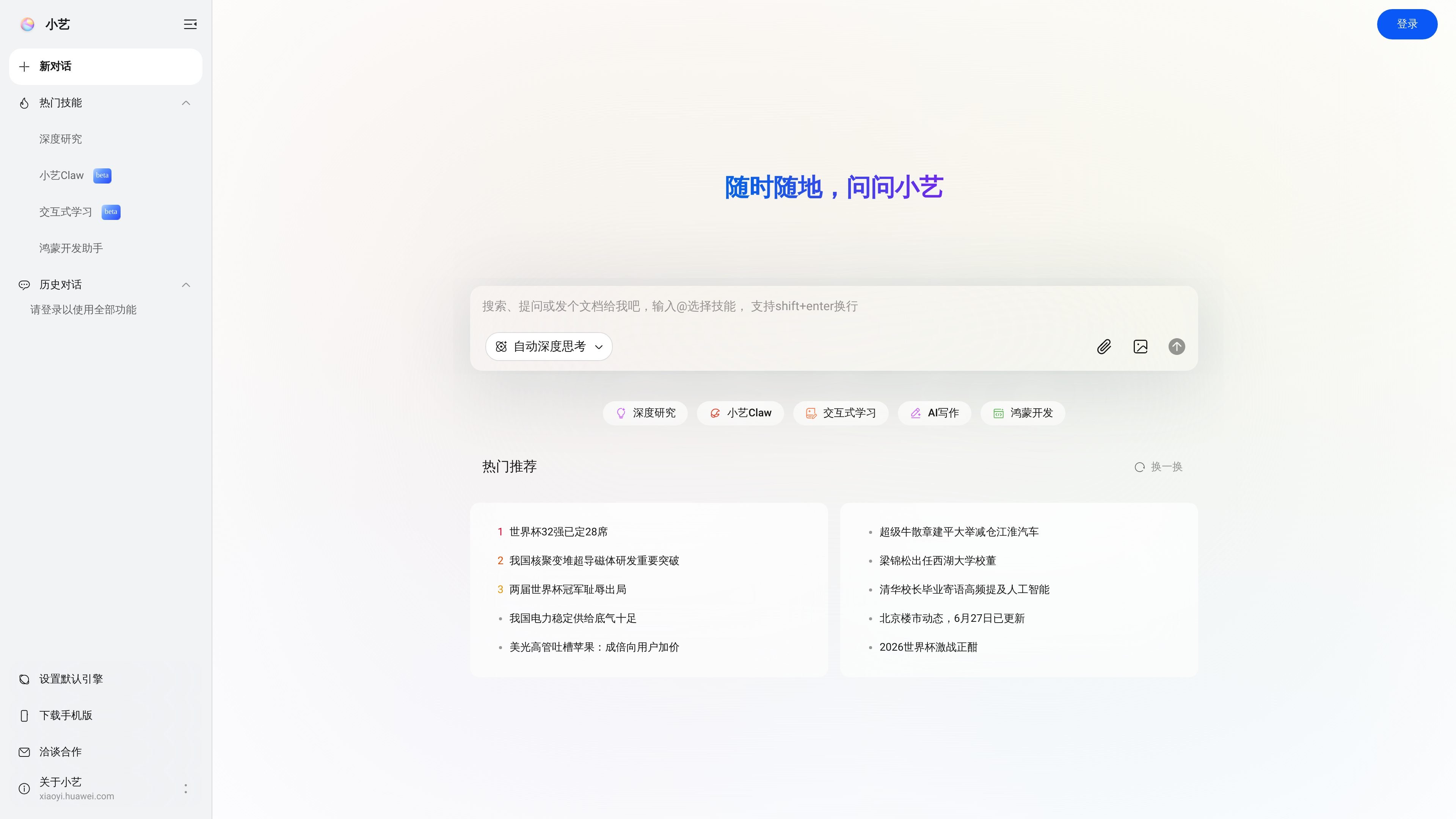
From the public page, Xiaoyi integrates knowledge Q&A, AI writing, AI document reading, document assistant, coding assistant, HarmonyOS code generation, HarmonyOS code Q&A, and AI image recognition. It also provides entries such as Deep Research, Interactive Learning, and Xiaoyi Claw, and supports dragging and dropping files to process document content, making it suitable for handling materials, reading, and Q&A in one workflow.

Cosa può fare 小艺?

Multiple AI capabilities integrated into one entry point

Supports AI knowledge Q&A, AI writing, AI document reading, document assistant, coding assistant, HarmonyOS code generation, HarmonyOS code Q&A, and AI image recognition, covering common tasks such as information retrieval, content generation, and image understanding.

Supports new chats and history

The homepage provides “New Chat” and chat history entry points, making it easy to continue tracking previous Q&A and task context.

Switchable task modes

The page offers skill or mode entry points such as “Deep Thinking,” “Deep Research,” “Xiaoyi Claw,” “Interactive Learning,” “AI Writing,” and “HarmonyOS Development,” allowing users to switch based on the task.

Supports multi-file upload and processing

The chat area supports file drag-and-drop, indicates a maximum of 50 files, and lists acceptable document formats, making it suitable for handing materials directly to the assistant.

Engine settings and mobile entry

The page shows a “Default Engine” setting and a mobile download entry, indicating some level of preference configuration and mobile access support.

Casi d'uso

“Everyday Q&A and research”

When you need quick answers, organize concepts, or reason from materials, you can ask directly in a new chat and use Deep Thinking or Deep Research for more complex questions.

“Writing and document organization”

When you need to draft instructions, summarize content, or rewrite text, you can use AI Writing and document reading to turn source material into editable output.

“Batch document processing”

When you are dealing with reports, contracts, spreadsheets, or presentations, you can drag in files first and then let Xiaoyi extract information, read content, or help organize the documents.

“HarmonyOS development assistance”

When you are developing HarmonyOS-related content, you can switch to HarmonyOS Development or the HarmonyOS code generation and code Q&A entry points for code and implementation assistance.

“Image understanding and retrieval”

When you need to identify image content or extract information from visuals, you can use AI image recognition to turn visual input into material you can ask questions about.

Domande frequenti

What can Xiaoyi mainly do?

Xiaoyi is Huawei’s in-house AI smart assistant, which can be used for knowledge Q&A, writing, document reading, code assistance, and image recognition. The page shows that these capabilities can be used directly in the chat interface, and it supports dragging and dropping files to process document content.

What visible feature entry points does Xiaoyi have?

The page shows Xiaoyi provides entry points such as “New Chat,” Popular Skills, Deep Research, Xiaoyi Claw, Interactive Learning, AI Writing, and HarmonyOS Development; some capabilities are labeled beta.

Do I need to log in to use Xiaoyi?

The homepage says “Please log in to use all features,” so some capabilities may require signing in to use them fully.

What files does Xiaoyi support uploading?

The page provides a drag-and-drop file upload area that supports up to 50 files, including pdf, txt, html, docx, doc, xlsx, xls, pptx, and ppt.

Does Xiaoyi have public pricing or plans?

No pricing or plan information is available on the captured page; the `/pricing` page returns 404, so pricing cannot be confirmed from this site.

Informazioni rapide

Category
AI smart assistant
Official website
xiaoyi.huawei.com
Developer
Huawei
Primary use cases
Knowledge Q&A, writing, document processing, code assistance, image recognition
File upload limit
Up to 50 files
Supported file types
pdf, txt, html, docx, doc, xlsx, xls, pptx, ppt

Analisi del traffico di 小艺

I dati sul traffico sono solo a scopo di riferimento.

Visite mensili
110,1K
Classifica globale
-
Frequenza di rimbalzo
45.2%
Durata media visita
02:15
Pagine per visita
2.92
Domain Rating
92

Trend del traffico

Fonti di traffico

Le analisi del traffico non sono ancora disponibili.

Principali regioni

Alternative a 小艺

ERNIE logo

ERNIE

yiyan.baidu.com

ERNIE, noto anche come 文心一言, è l’assistente AI web di Baidu per chat, domande e risposte, immagini, scrittura, lettura di documenti e traduzioni.

智谱清言 logo

智谱清言

chatglm.cn

智谱清言 è un assistente AI basato su GLM-5 per conversare, scrivere, programmare e comprendere immagini e documenti.

Cody logo

Cody

meetcody.ai

Cody è un assistente IA per il business addestrato sulla knowledge base aziendale per rispondere alle domande, supportare i flussi di lavoro dei team e fornire risposte corredate da fonti. Aiuta ad automatizzare il supporto, l’onboarding e altre attività interne usando documenti e contenuti del sito web.

灵光AI logo

灵光AI

lingguang.com

灵光AI è l’assistente AI in lingua cinese di Ant Group per chat, scrittura, traduzione, generazione di immagini e programmazione.