
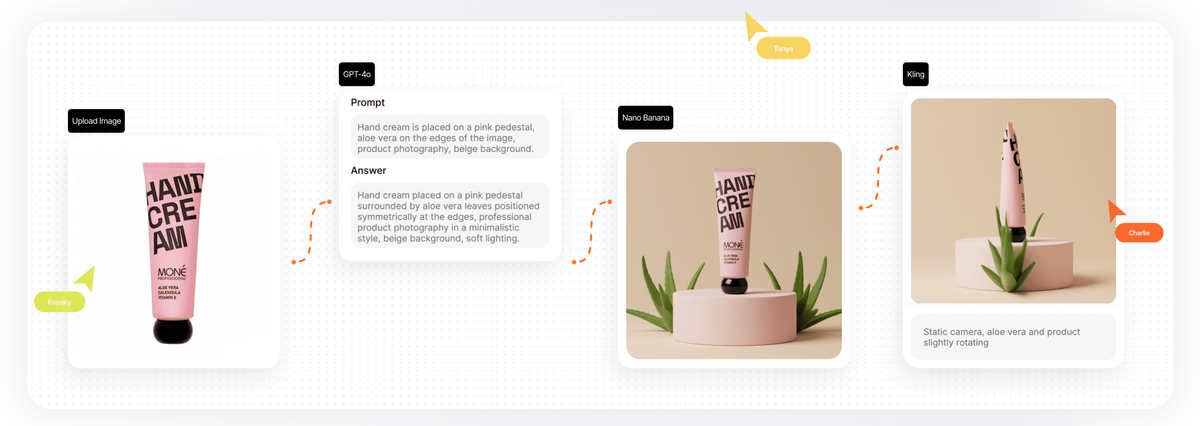
Multiple AI model access
The workspace combines 30+ AI models for image generation, image editing, video, text, 3D, sound, and related creative tasks in one place.

Spazio di design AI basato su browser con oltre 30 modelli e template
Phygital+ is a browser-based AI design workspace for creating, refining, and delivering visual content with multiple AI tools in one place. The homepage describes it as an AI design pipeline workspace with more than 30 models and control across the creative process, from pre-production to post-production.
The site positions the product for design teams, creative agencies, marketing teams, e-commerce brands, interior and architecture work, film and animation, and education. It combines image, video, text, 3D, and training tools with templates that help users start from a defined workflow instead of an empty canvas.
The workspace combines 30+ AI models for image generation, image editing, video, text, 3D, sound, and related creative tasks in one place.
The library offers prebuilt templates that chain models, prompts, and post-processing so users can start from a guided workflow instead of a blank canvas.
The site highlights image generation, video generation, image-to-motion, editing effects, upscaling, background removal, and other visual tools across the product pages.
Education materials list training on SD XL and FLUX, custom dataset upload, and training by style, object, or person.
The pricing page includes team and enterprise options with centralized billing, admin controls and permissions, priority support, and onboarding sessions.
The education page says projects can be shared with students and accessed from the browser without local installation.
Use the template library to generate campaign-ready scenes, product visuals, or key visuals without starting from a blank page.
Edit source images with tools such as inpaint, outpaint, background removal, style transfer, and context-aware adjustments.
Build motion pieces or short video concepts using supported video models and image-to-motion workflows.
Train or adapt styles and subjects through the education-facing LoRA training tools and custom dataset upload options.
Share templates and projects with a class or team and manage work centrally through browser access and role-based plan features.
Phygital+ is positioned as a browser-based AI design workspace. The homepage presents it as a place to create, refine, and deliver visuals with 30+ AI models, while the education page adds tools for image generation, editing, 3D, video, and model training.
The pricing page shows a free plan with weekly credits and paid plans for more monthly credits, more projects, commercial use, and team features. The site also lists an Enterprise option with SSO, API and integration support, and onboarding.
The site says you can upload images, import files, and use templates and prompts inside the workspace. The homepage also describes each template as a tuned chain of models, prompts, and post-processing opened with one click.
Yes. The pricing page says commercial use is included on Starter, Pro, and Teams plans, and the education page says projects can be shared with students in an education setting.
The source pages emphasize browser access and do not describe a desktop app installation requirement. The education page explicitly says full access is available from the browser.
I dati sul traffico sono solo a scopo di riferimento.

flora.ai
FLORA è una canvas creativa basata sull’AI per designer, team di brand, agenzie e team creativi interni. Riunisce generazione, modifica e collaborazione in un unico spazio di lavoro, con accesso a oltre 50 modelli di testo, immagini e video.

wizad.ai
Wizad è uno strumento di design AI basato sul web per creare post brandizzati, poster e grafiche con modelli.

www.mondaymerch.com
Design Studio is Monday Merch’s browser-based tool for placing a brand, artwork, or text on customizable merchandise. Users can start from a template or a blank design, preview multiple product sides, and move toward ordering without design software.

kittl.com
Piattaforma di design AI basata su browser per creatori e aziende

gaoding.com
稿定设计 è una piattaforma di design online per creare rapidamente poster, PPT, pagine H5, immagini e video con modelli, risorse e strumenti di IA.

uxpilot.ai
UX Pilot è uno strumento di design con IA per creare wireframe, concept UI e template per siti web da prompt o riferimenti, con modifica iterativa ed esportazione in Figma o codice.