
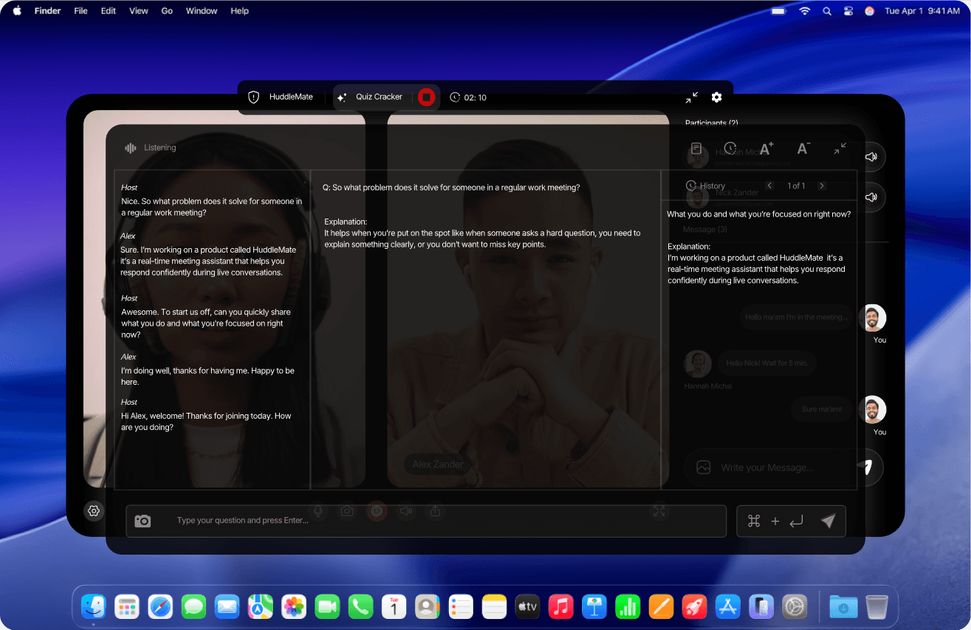
Real-time conversation awareness
The assistant listens to the full conversation and uses live context, rather than only responding to a single question in isolation.

Assistente per riunioni con IA in tempo reale per colloqui, chiamate, riunioni e quiz
HuddleMate is a real-time AI meeting assistant for interviews, sales calls, meetings, and trivia. It listens to the conversation, can see your screen, and generates instant answers that are meant to help you respond without long pauses or improvised filler.
The product is presented as a private copilot that runs on your device rather than joining the call as a visible participant. Public pages show it being used with interview prompts, structured answer formats like STAR, and custom reference material such as resumes, job descriptions, notes, and talking points.
The assistant listens to the full conversation and uses live context, rather than only responding to a single question in isolation.
It reads your screen as well as the meeting audio so answers can reference what is on display and what was just discussed.
The site shows multiple response styles, including short answers and STAR-formatted answers for structured interview responses.
Users can add resumes, job descriptions, notes, docs, and other reference material so responses can reflect their own background.
The site says it works privately on your device and does not join the meeting as a visible participant, which is positioned as a privacy feature.
Pricing information on the site points to pay-per-use minutes and says purchased minutes never expire.
For behavioral, situational, or technical interviews, HuddleMate can turn your resume and notes into a structured response while the interviewer is still speaking. The interview page shows examples of instant answers and STAR-style formatting.
For sales conversations and client calls, the assistant is positioned to help you respond to pricing objections, keep momentum, and stay on message when questions arrive quickly. The homepage and comparison pages both frame it as useful in live calls and meetings.
For trivia or quiz-style rounds, the product is shown surfacing an answer while the user remains muted, which is useful when speed matters more than drafting a long response.
For standups, team meetings, and other fast-moving discussions, HuddleMate can provide instant prompts when you need a number, detail, or clear talking point without searching notes mid-conversation.
For live coding or technical discussions, the site highlights screen analysis and coding support as part of the workflow, which suggests it can help explain what is on screen and respond to technical questions.
HuddleMate runs privately on your device and the site says it never joins as a visible participant or injects bots. The public copy also says it stays hidden during screen sharing.
The homepage says it works with all meeting apps, and the interview page references Zoom, Teams, and Meet. The site also says it can listen and see your screen in real time, but it does not publish a full setup guide here.
The pricing information shown on the site includes a free tier with 5 free minutes per hour and a paid option listed as pay-per-use minutes. The pricing page itself is not available, so the public site only confirms the rough pricing shape.
The site positions HuddleMate for interviews, sales calls, meetings, trivia, and other high-pressure conversations. It also shows an interview copilot, a trivia mode, and a custom meeting assistant option.
The public pages mention adding your resume, job description, notes, docs, or talking points so the assistant can tailor answers. They also describe switching response styles such as short answers or STAR format, but they do not show a full team-collaboration workflow.
I dati sul traffico sono solo a scopo di riferimento.

parakeet-ai.com
Assistente AI per colloqui con risposte in tempo reale durante interviste e chiamate di coding

tryassistly.com
Assistly è un assistente per riunioni in diretta per macOS e Windows: offre indicazioni in tempo reale durante le chiamate e ne prepara un riepilogo al termine. Funziona direttamente dal computer senza partecipare come bot e rende disponibile la cronologia delle chiamate alle app collegate tramite un server MCP.

lockedinai.com
LockedIn AI offre risposte in tempo reale, assistenza al codice e coaching per colloqui e riunioni.

trysayble.com
Sayble è un copilota AI per conversazioni in tempo reale, pensato per chiamate di vendita, riunioni, trattative e altri scambi professionali. Trascrive entrambe le parti della chiamata, suggerisce cosa dire e, al termine, prepara riepiloghi e bozze di follow-up.

fellow.app
Assistente AI per riunioni con trascrizioni, riepiloghi e attività

meetgeek.ai
Assistente AI per registrare, trascrivere, riassumere e organizzare riunioni