
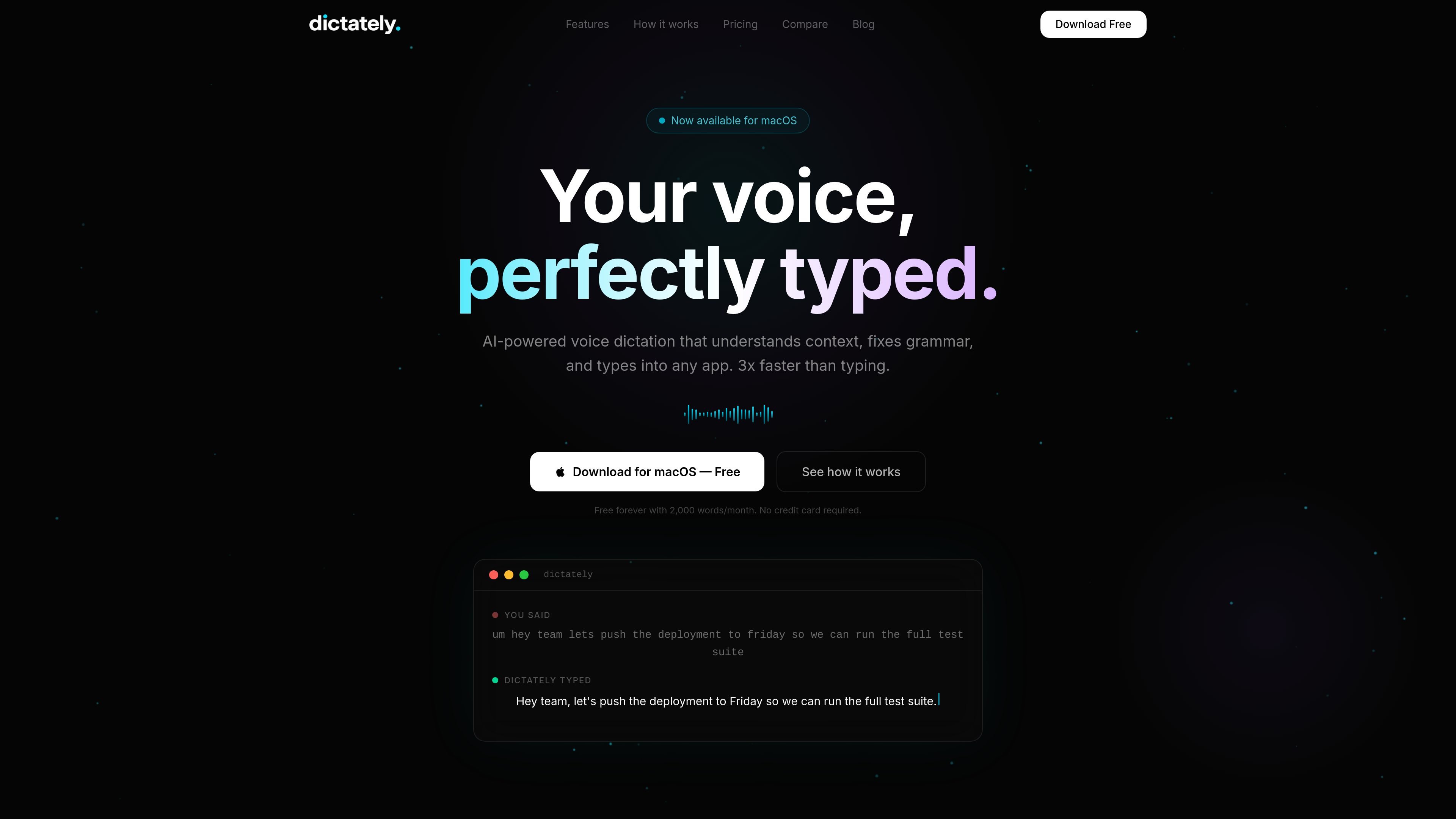
Types into any app
Dictately transcribes speech directly into the app you are currently using, so the output appears where you need it without copying and pasting.

Dictately è un’app di dettatura vocale per macOS che inserisce il testo pronunciato nell’app attiva e lo rifinisce con l’AI. È pensata per scrivere più velocemente in chat, email, documenti e strumenti per sviluppatori.
Dictately is a macOS voice dictation app that turns spoken input into typed text inside the app you are already working in. The site positions it as a tool for people who want faster dictation than manual typing, with the result cleaned up by AI before it appears on screen.
The product focuses on a simple workflow: hold a key, speak naturally, release, and let Dictately inject the text directly into the active application. It is presented as working across many desktop apps and writing environments, from chat and email to code editors and document tools.
Beyond transcription, Dictately adds automatic cleanup for grammar, punctuation, filler words, and formatting. The site also highlights context awareness, multilingual support, and an on-device private English mode, which together suggest it is designed for both general writing and more specific professional workflows on Mac.
Dictately transcribes speech directly into the app you are currently using, so the output appears where you need it without copying and pasting.
The app removes filler words, fixes grammar, adds punctuation, and formats the result automatically after you speak.
Dictately looks at the active app and adjusts tone accordingly, aiming for casual Slack messages, professional email, or technical code-adjacent text.
You can ask it to change what you said, such as making text more professional or summarizing it, using a command-style flow.
The product supports 99+ languages with automatic detection and says it can switch languages mid-sentence.
The site states that an on-device private English mode is available, and the product page also emphasizes a hold-key, talk, release workflow.
Use Dictately for day-to-day writing in Slack, email, and chat tools when you want to draft messages faster than typing and have the result cleaned up automatically.
In VS Code, Cursor, IntelliJ, or Xcode, the app can be used for code comments, PR descriptions, documentation, and other text-heavy developer writing where context matters.
People who write in multiple languages can speak naturally and let the app detect language automatically, including switching languages mid-sentence.
Users who want cleaner first drafts can speak rough notes or rambling thoughts and rely on the AI cleanup to remove fillers, add punctuation, and polish the tone.
The site also frames Dictately as useful for accessibility needs and repetitive writing tasks, including users dealing with wrist pain or other typing strain.
Dictately is a macOS voice dictation app that types what you say directly into the active app. It also offers AI cleanup so spoken drafts come out with cleaner grammar, punctuation, and formatting.
The source says Dictately is available for macOS and supports Apple Silicon and Intel Macs. No Windows or mobile version is described on the site pages provided.
The site says Dictately injects text directly into any app and works in tools such as Slack, Gmail, VS Code, Cursor, Notion, Obsidian, Google Docs, ChatGPT, Claude, Figma, Linear, Discord, Telegram, WhatsApp, Microsoft Word, Outlook, Teams, Arc, Chrome, Safari, Terminal, iTerm, Warp, Sublime Text, IntelliJ, Xcode, Notes, Bear, Craft, Todoist, Asana, Jira, GitHub, GitLab, Zoom, Google Meet, Webex, Superhuman, Spark, and Raycast.
The landing page says there is a free plan with 2,000 words per month and no credit card required. It also lists Pro at £6.99/month and a Lifetime option at £199, but the pricing page itself was unavailable.
The source does not provide a detailed FAQ about export behavior, team setup, or admin controls. It does mention an Enterprise contact option, but no further details are given on the pages provided.
I dati sul traffico sono solo a scopo di riferimento.
wisproapp.com
Wispro è un’app nativa per Windows che permette di dettare a voce e incolla il testo trascritto o riscritto nell’applicazione attiva. Ti aiuta a scrivere più velocemente con un tasto di scelta rapida, l’input vocale e tre modalità di flusso di lavoro.

frigade.com
Yap è un’app di dettatura gratuita e open source per macOS che converte la voce in testo in qualsiasi campo di immissione. Usa il riconoscimento vocale sul dispositivo e salva le trascrizioni in locale, senza account, chiave API, telemetria né codice di rete.

wisprflow.ai
Wispr Flow è uno strumento multipiattaforma di dettatura vocale che trasforma la voce in testo rifinito nelle app su Mac, Windows, iPhone e Android. Supporta i flussi di scrittura individuali e offre funzioni per team e amministratori in ambito aziendale.

flowvoice.ai
Strumento di dettatura vocale AI che trasforma la voce in testo rifinito su Mac, Windows, iPhone e Android

www.epilude.com
Epilude è una suite di produttività vocale per Mac che trasforma il parlato in testo formattato in qualsiasi app. Include la revisione della dettatura, l’adattamento del tono, un vocabolario personalizzato e scorciatoie, oltre a una modalità locale che mantiene audio e testo sul Mac.

monologue.to
Monologue è un'app di dettatura vocale con IA per scrivere in modo naturale, trascrivere e creare riepiloghi su dispositivi Apple.