
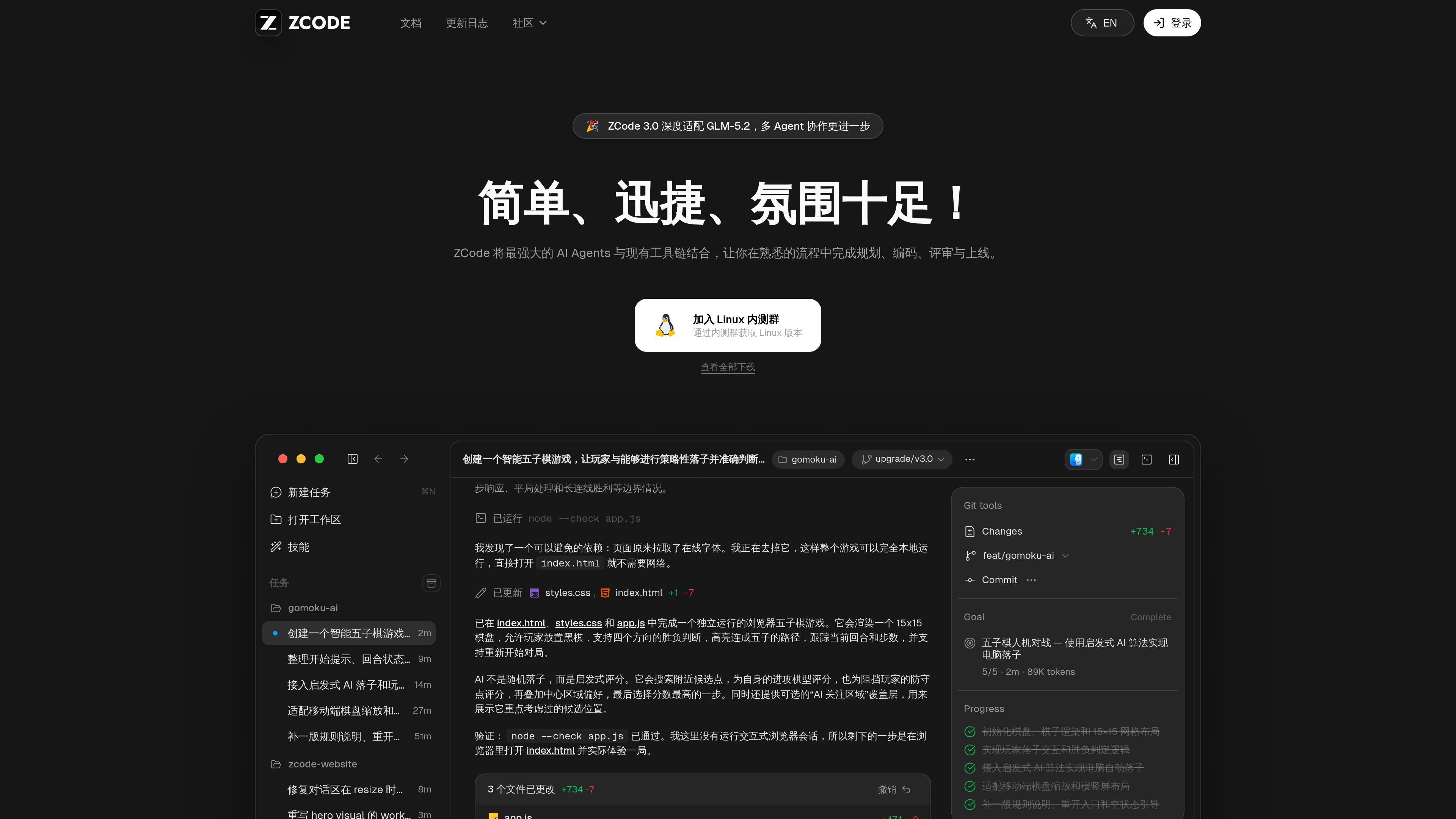
Agent-assisted developer workflow
The product positions AI Agents inside an existing development workflow instead of replacing the tools developers already use. The core message is that planning, implementation, review, and release stay connected.

ZCode associe des AI Agents à votre toolchain existante pour planifier, coder, réviser et publier, avec l’adaptation officielle de GLM-5.2 pour les workflows de développement.
ZCode is a developer tool presented as the official GLM-5.2 adaptation for coding workflows. Its public messaging focuses on combining AI Agents with the tools developers already use so work can continue through planning, coding, review, and release without leaving a familiar process.
The site content and changelog suggest a product built around agent-driven task execution, session branching, search, previews, and remote-workspace support. The available pages do not document every integration or pricing detail, so the product is best described conservatively as an AI-assisted development workspace and workflow layer rather than a fully specified IDE replacement.
The product positions AI Agents inside an existing development workflow instead of replacing the tools developers already use. The core message is that planning, implementation, review, and release stay connected.
The changelog points to planning mode, task handling, session branching, editable pending messages, and clearer status views, suggesting support for structured work across longer coding sessions.
Updates mention command search, file and folder mentions, diff previews, source previews, and Mermaid diagram previews, which indicate built-in navigation and review aids for development work.
The changelog includes remote workspace connection fixes, remote task list improvements, and terminal integration in the preview panel, showing support for remote and terminal-centered work.
Multiple changelog entries reference MCP configuration, SSH or remote connection stability, Windows behavior, and shell compatibility, which suggests the tool is designed to work across different developer environments.
Use ZCode when you want to keep your existing development process while adding agent-assisted help for planning, implementation, review, and release steps.
Use it for longer tasks that benefit from session branching, editable pending messages, and clearer task states, especially when a project needs multiple directions explored from the same starting point.
Use the product when working with remote workspaces or terminal-heavy setups, since the changelog highlights remote connection stability and preview-panel terminal integration.
Use it when reviewing code or navigating a task list, because the product adds search, source previews, diff previews, and clearer task organization views.
Use it in environments where Windows behavior, shell compatibility, or MCP configuration matter, since the changelog shows attention to those runtime details.
ZCode is presented as a GLM-5.2 official adaptation developer tool that connects AI Agents with an existing toolchain so users can move through planning, coding, review, and release in one familiar workflow.
The source describes ZCode as an AI Agents-based developer tool, but it does not list the specific editor, IDE, or platform integrations on the pages provided.
The public site text highlights a workflow that covers planning, coding, review, and going live. Beyond that, the provided pages do not document a detailed onboarding or setup process.
The pricing page provided returns a 404, so the available sources do not confirm pricing, tiers, or trial terms.
The changelog shows active product development with updates around planning mode, search, task handling, remote workspaces, MCP configuration, and Windows support, but it does not establish every feature as universally available on all platforms.
Les données de trafic sont fournies à titre indicatif uniquement.

zencoder.ai
Plateforme d’agents de développement IA pour planifier, coder, tester et réviser

traycer.ai
Traycer AI est un outil de développement axé sur les spécifications pour planifier, contextualiser et vérifier les workflows de code avec l’IA.

www.skippr.ai
Skippr est une plateforme d’agents IA en direct pour l’onboarding, les démonstrations, le support et les workflows internes. Intégrez-la à votre produit ou utilisez-la en session live pour répondre aux questions et accomplir des tâches avec les utilisateurs.

zaro.ai
Zaro est une plateforme de travail d’IA pour créer des applications internes, des agents et des workflows à partir des données de votre entreprise, avec un forfait d’essai gratuit et des offres payantes pour des usages plus importants.

devin.ai
Devin est un agent de codage et un ingénieur logiciel doté d’IA pour les développeurs et les équipes d’ingénierie. Il propose un accès depuis un ordinateur, la CLI et les IDE, ainsi que des offres pour les équipes et les entreprises, avec des workflows d’agents cloud et des contrôles d’administration.

www.warp.dev
Warp est un environnement de développement agentique pour coder dans le terminal et le cloud, avec des offres pour particuliers, équipes et entreprises.