
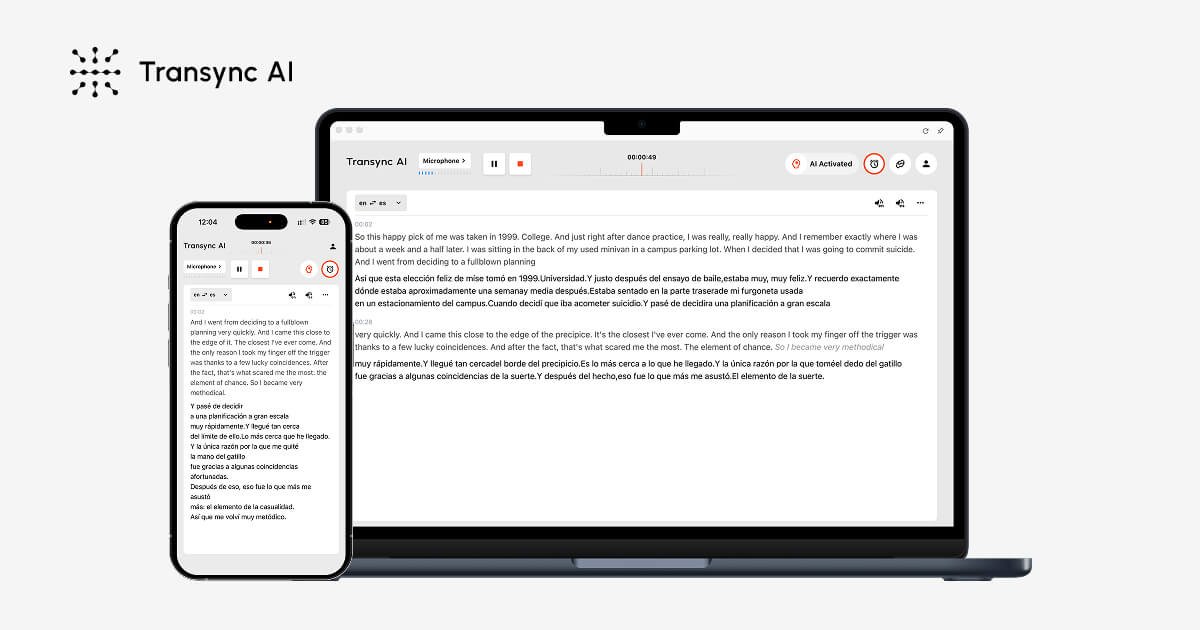
Real-time two-way interpretation
Translates live speech into bilingual subtitles with low latency and automatic language detection, so participants can follow both sides of a conversation as it happens.

Transync AI traduit en temps réel les réunions et conversations multilingues, avec sous-titres bilingues, lecture vocale, notes et accès sur ordinateur, mobile et web.
Transync AI is a real-time AI translation product for multilingual meetings and conversations. It converts speech into bilingual subtitles and translated voice output, with support for live interpretation across meetings, classes, calls, travel, and face-to-face communication.
The product is presented as cross-platform software for macOS, Windows, iOS, Android, and the web. Source pages describe it as working with Zoom, Microsoft Teams, Google Meet, WhatsApp calls, and browser-based workflows, with a free entry tier and paid plans for heavier use.
Translates live speech into bilingual subtitles with low latency and automatic language detection, so participants can follow both sides of a conversation as it happens.
Reads translated content aloud with natural male and female voices, streaming voice output, and voice clone support for workflows where spoken translation is needed.
Works with Zoom, Microsoft Teams, Google Meet, WhatsApp calls, and in-person meetings without requiring a meeting bot or browser extension.
Captures multilingual conversations, generates bilingual meeting notes, and includes AI summaries, action items, and key decisions.
Uses professional keywords and context to improve translation accuracy in specialized conversations and business settings.
Keeps subtitles visible in a floating window or picture-in-picture view with always-on-top display and adjustable sizing and position.
Run multilingual team meetings with live subtitles and translated speech so participants can follow the discussion without separate interpreting tools.
Support client calls, sales conversations, and cross-border collaboration where quick back-and-forth translation matters more than formal interpretation.
Use the product in classes, webinars, and training sessions when attendees need to read and hear translated content during the session.
Handle travel, in-person meetings, exhibitions, and restaurant or transport interactions where fast translation is needed outside a conference app.
Capture meeting notes, bilingual transcripts, and key decisions for later review when the conversation is multilingual and needs a written record.
Transync AI is designed to work in meetings, calls, classes, demos, and in-person conversations. The source pages describe it as supporting multilingual communication with bilingual subtitles, voice playback, meeting notes, and virtual microphone output.
The source pages say it works with Zoom, Microsoft Teams, Google Meet, WhatsApp calls, and browser-based meetings. It also supports desktop, mobile, and web workflows on macOS, Windows, iOS, and Android.
The pricing page lists a free plan with 40 minutes of real-time translation on sign-up, plus paid Personal Premium and Enterprise plans. The source also says usage can be billed through monthly membership and, for enterprises, pay-as-you-go after included hours are exhausted.
Transync AI provides real-time translation, bilingual subtitles, translated voice playback, AI meeting minutes, and context-aware translation using professional keywords and context. The source also mentions voice clone and floating subtitle views.
The source states that customer data is processed to provide the translation service and is not used for AI training by default. It also says audio is immediately deleted after processing and that voice recordings are not stored for training.
Les données de trafic sont fournies à titre indicatif uniquement.

scripod.com
Scripod est un copilote de podcast basé sur le Web qui génère sous-titres, résumés et notes, avec recherche, favoris et gestion de bibliothèque.

dubverse.ai
Plateforme d’IA générative pour doublage, synthèse vocale, sous-titres et API vocales

vmeg.pro
VMEG AI est une plateforme de localisation vidéo basée sur l’IA qui traduit, double, sous-titre et adapte les vidéos dans plus de 170 langues. Elle propose des outils en libre-service et une prestation gérée avec assistance humaine pour les créateurs, les spécialistes du marketing, les enseignants et les équipes.

addsubtitle.ai
Add Subtitle.ai est un outil de localisation vidéo par IA accessible depuis un navigateur, pour traduire des vidéos, créer des sous-titres, doubler et réécrire les dialogues, avec des offres gratuites, payantes et Enterprise avec API/SDK et déploiement privé.

zapcap.ai
Générateur de sous-titres vidéo IA avec B-roll, transitions et publication

rendercut.io
Outil en ligne pour transformer vidéos ou audio en clips courts sous-titrés, avec sous-titres stylés, B-roll, GIF et export vers TikTok, Reels et YouTube.