
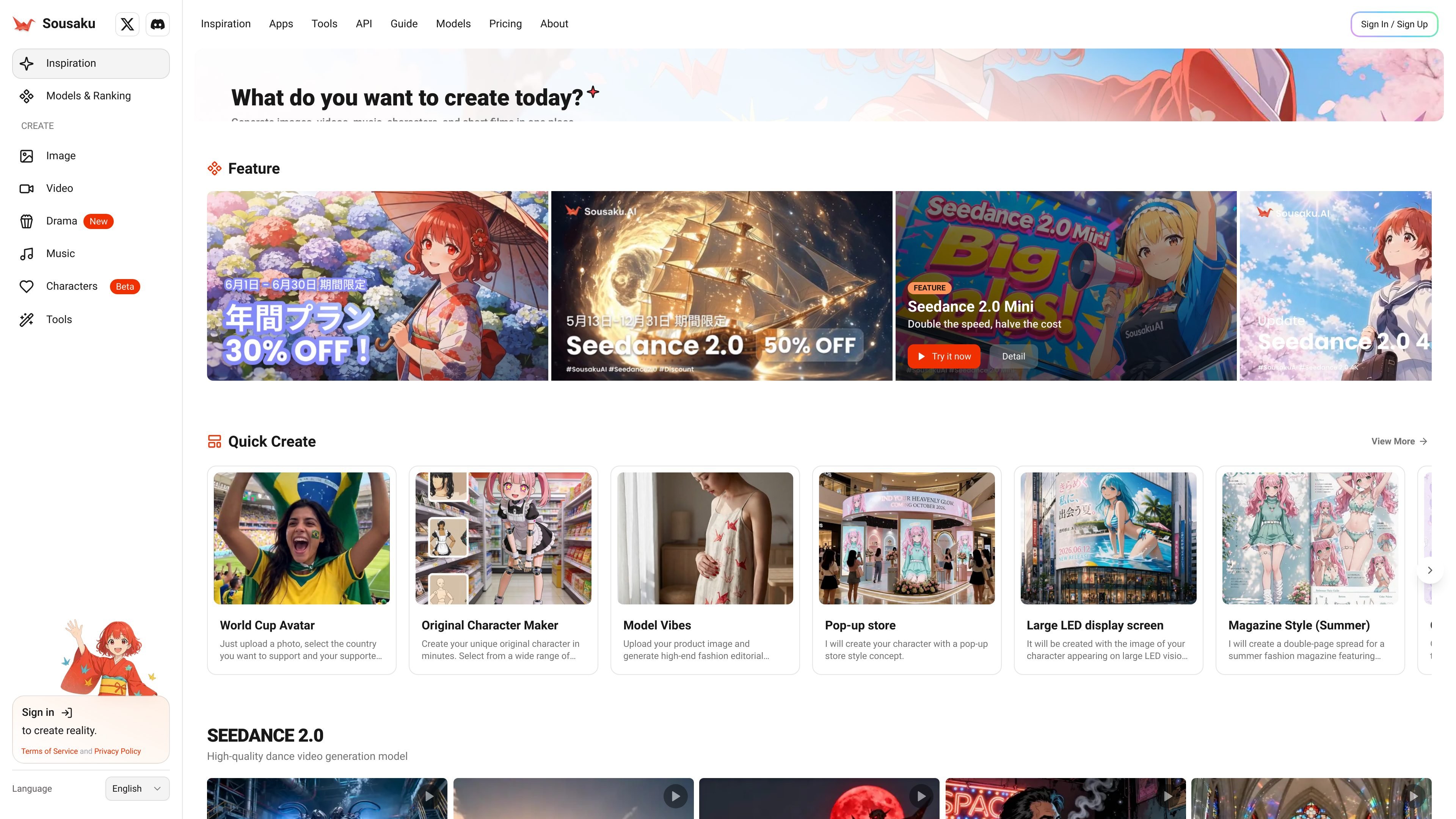
Multi-format creation
Generate images, videos, music, characters, and short-drama style content from one interface. The homepage presents Sousaku AI as an all-in-one creative platform rather than a single-purpose generator.

Sousaku AI est une plateforme créative d’IA qui génère des images, des vidéos et d’autres contenus à partir de prompts texte ou image, avec sélection de modèles, crédits et plusieurs modes d’entrée vidéo.
Sousaku AI is an AI creation platform focused on generating images, videos, and other creative outputs from text and image prompts. The homepage positions it as an all-in-one tool for turning ideas into finished visuals or media with a single workflow.
The product centers on model selection, prompt-driven generation, and output controls such as resolution, aspect ratio, and video length. Its model pages show supported workflows like text-to-video, image-to-video, and reference-image-to-video, while the homepage and FAQ point to credits, login-based access, and commercial-use guidance.
Generate images, videos, music, characters, and short-drama style content from one interface. The homepage presents Sousaku AI as an all-in-one creative platform rather than a single-purpose generator.
Choose from many named models, including Seedance 2.0, Seedance 2.0 Mini, GPT Image 2.0 Medium, WAN Video 2.7, Kling 3.0, and Google Veo 3.1. The homepage and model pages show a model-selection workflow with side-by-side comparisons.
Video model pages support text-to-video, image-to-video, and reference-image-to-video workflows, with audio enabled for the showcased video models. That gives users multiple ways to direct the output input.
Model pages expose technical controls such as resolution, aspect ratio, and video length. For example, Seedance 2.0 Mini lists 480p and 720p outputs, while Seedance 2.0 lists 480p, 720p, 1080p, and 4K.
The site includes prompt examples and showcase prompts for different visual styles and scenarios, from cinematic action scenes to fashion imagery and pixel art. These examples help users understand how to describe the result they want.
The FAQ and plan notes describe credit-based usage, monthly login bonuses, auto-credit return on failed generation, and commercial-use guidance. Those pieces suggest a workflow built around logged-in creation rather than anonymous one-off generation.
Use the homepage model picker and prompt examples to create social or campaign visuals from a text brief or a reference image. The site shows image-generation models such as GPT Image 2.0 Medium and multiple stylized example prompts.
Create short cinematic clips by choosing a video model such as Seedance 2.0 or Seedance 2.0 Mini, then supplying text, an image, or a reference image depending on the model. The showcased prompts emphasize action scenes, character motion, and camera movement.
Build character-driven artwork and scene mockups using the site’s example templates for original characters, fashion layouts, chat-style screens, and game-like scenes. These examples are useful when the goal is a repeatable visual style rather than a one-off illustration.
Test different model families through the comparison links before committing credits to a generation. The site explicitly offers quick comparisons such as Seedance 2.0 Mini vs WAN Video 2.6 and Seedance 2.0 vs Veo 3.0.
Use the credit system and login-based generation for ongoing creative work, including repeat attempts when refining prompts. The FAQ notes login bonuses, credit costs by output type, and credit refunds when generation fails.
The homepage indicates that users can generate images, videos, music, characters, and short-drama style content from text or images. The model pages also show text-to-video, image-to-video, and reference-image-to-video workflows for supported video models.
The site says generation usually takes about 30 seconds to a few minutes for images and 3 to 15 minutes for videos, depending on load and resolution. Higher-priority queueing is mentioned for paid members.
No. The FAQ says new registrations receive 20 credits, which can generate up to 20 images or 6 videos, and monthly login bonuses can add up to 20 credits. The pricing page itself returns a 404, so detailed plan names are not visible in the provided sources.
Yes, the site explicitly states that it provides full commercial-use rights and guidance for safe content creation. It also notes that paid members get priority queue handling.
The FAQ recommends structuring prompts as main theme, style, details, lighting, and atmosphere. The model pages also show that logged-in users can begin generation after choosing a model and entering a prompt.
Les données de trafic sont fournies à titre indicatif uniquement.

hailuoai.com
海螺视频 est un outil de création IA en ligne qui génère des vidéos à partir de texte, d’images ou de plusieurs références, avec aussi des fonctions pour créer des images, des voix et de la musique.

seeddance.app
Seedance 2.0 génère de courtes vidéos à partir de texte ou d’images, avec contrôles studio et crédits flexibles.

aiimagetovideo.pro
AI Image to Video Pro est un générateur vidéo IA en ligne qui transforme des images ou des descriptions textuelles en courtes vidéos. Il propose une offre gratuite, des formules payantes avec crédits et des outils complémentaires pour les flux de travail liés aux prompts et aux vidéos.

pika.art
Pika est une plateforme vidéo IA pour créer et modifier de courtes vidéos à partir de prompts, d’images et de séquences existantes.

vadoo.tv
Vadoo AI crée des vidéos courtes et des ressources visuelles à partir de prompts, scripts, images ou vidéos, avec hébergement, partage, analyses et forfaits pour équipes.

creatorkit.com
CreatorKit est une plateforme de contenu basée sur l’IA qui génère des vidéos, des publicités et des images de produits à partir d’une image, d’un enregistrement vocal, d’un lien ou d’un brief, pour aider les équipes marketing à créer et à itérer plus rapidement.