
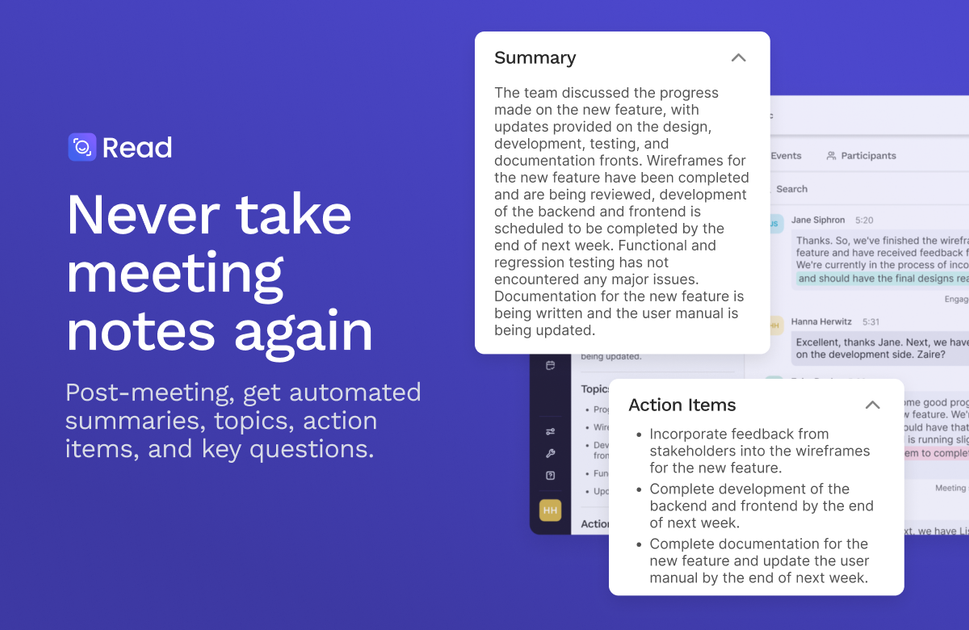
Meeting recording and recaps
Read can join scheduled meetings and generate auto-produced recaps, action items, highlights, and transcripts. It supports Zoom, Teams, and Meet for in-meeting note taking.

Assistant de réunion IA et recherche d’entreprise pour résumés, transcriptions et réponses
Read AI is an AI meeting assistant and enterprise search product that turns live meetings, emails, messages, and documents into summaries, transcripts, and searchable knowledge. The site describes it as a copilot that helps people capture conversations, find answers faster, and share meeting outcomes across tools.
The product joins or records meetings, produces recaps with topics and action items, and supports search across connected content with citations back to the source discussion. It is positioned for individuals, teams, and larger organizations, with plans that add collaboration, playback, admin, and security controls as needs grow.
Read can join scheduled meetings and generate auto-produced recaps, action items, highlights, and transcripts. It supports Zoom, Teams, and Meet for in-meeting note taking.
Ask Read provides search across meetings, emails, messages, and related content, with citations back to where information was discussed.
Read AI summarizes email conversations and generates topic summaries from Gmail and Outlook, extending the product beyond live meetings.
The assistant view includes meeting timer, talk time, engagement cues, and speaker coaching metrics that help participants keep meetings balanced and on schedule.
The integrations catalog includes desktop, mobile, calendar, CRM, collaboration, and workflow tools so summaries and notes can be shared into existing systems.
The product supports mobile capture and desktop apps, plus Chrome access for use in Google Meet, Gmail, and Chrome.
Capture a meeting without manual note taking, then review the summary, transcript, action items, and key questions afterward.
Ask questions across prior meetings, emails, and messages when you need to find a decision or context that was discussed earlier.
Track talk time, meeting length, and engagement cues during a call to encourage more balanced participation.
Send recaps into tools like Slack, CRM systems, calendars, or workflow automations so information reaches the rest of the team without retyping.
Use desktop, mobile, or Chrome-based access to capture in-person conversations, on-the-go notes, and meetings inside the tools already in use.
Read AI can join meetings in Zoom, Microsoft Teams, and Google Meet to record, transcribe, and generate a recap with summaries, topics, action items, and key questions.
The pricing page shows a Free plan for individuals, with paid Pro, Enterprise, and Enterprise+ plans for individuals, teams, and larger organizations. Paid plans add capabilities such as unlimited meeting transcripts, premium integrations, playback, and additional admin controls.
Read AI is available on Windows, Mac, Android, and iPhone, and it also offers Chrome access for use in Google Meet, Gmail, and Chrome.
The site says Read AI can search across meetings, emails, messages, documents, and other connected content, and can surface answers with citations to where information was discussed.
The integrations page shows connections with tools such as Slack, HubSpot, Salesforce, Google Calendar, Outlook 365, Zoom Calendar, Zapier, and webhooks, plus desktop and mobile apps.
Les données de trafic sont fournies à titre indicatif uniquement.
| mars | 4143562 |
|---|---|
| avr. | 3987894 |
| mai | 4107849 |

heyhelp.ai
HeyHelp est un assistant e-mail IA pour Gmail qui rédige des réponses, organise les boîtes de réception et automatise les relances et la planification.

fyxer.ai
Fyxer est un assistant e-mail qui organise votre boîte de réception, rédige des réponses dans votre style et prend des notes de réunion. Compatible avec Gmail et Outlook, il propose un essai gratuit de 7 jours.

serif.ai
Serif est un assistant e-mail IA pour Gmail et Outlook qui rédige des réponses, trie les messages entrants et gère les tâches courantes pour les équipes et les indépendants.

tonebird.ai
ToneBird est un assistant de réponse IA pour ordinateur qui aide à rédiger des messages dans les applications de messagerie et de chat. Il s’appuie sur le contexte des conversations, la mémoire des relations et les documents connectés pour suggérer des réponses que vous pouvez modifier, insérer, vérifier et envoyer vous-même.

fridaymail.ai
Assistant IA pour Gmail qui résume les messages, rédige des réponses, planifie des réunions et gère les tâches courantes

lindy.ai
Assistant exécutif IA pour gérer e-mails, réunions, calendrier et suivis