
Multi-source screen capture
Record a display, window, or selected area with microphone, webcam, system audio, and keystrokes from one control. Recording can also be paused and resumed, or scheduled for a later start.

Dina est un outil macOS d’enregistrement d’écran et de montage vidéo qui améliore automatiquement les enregistrements avec zoom, mouvements du curseur, sous-titres, mises en page et effets cinématographiques. Créez des démos, tutoriels, présentations et autres vidéos soignées, prêtes à être diffusées.
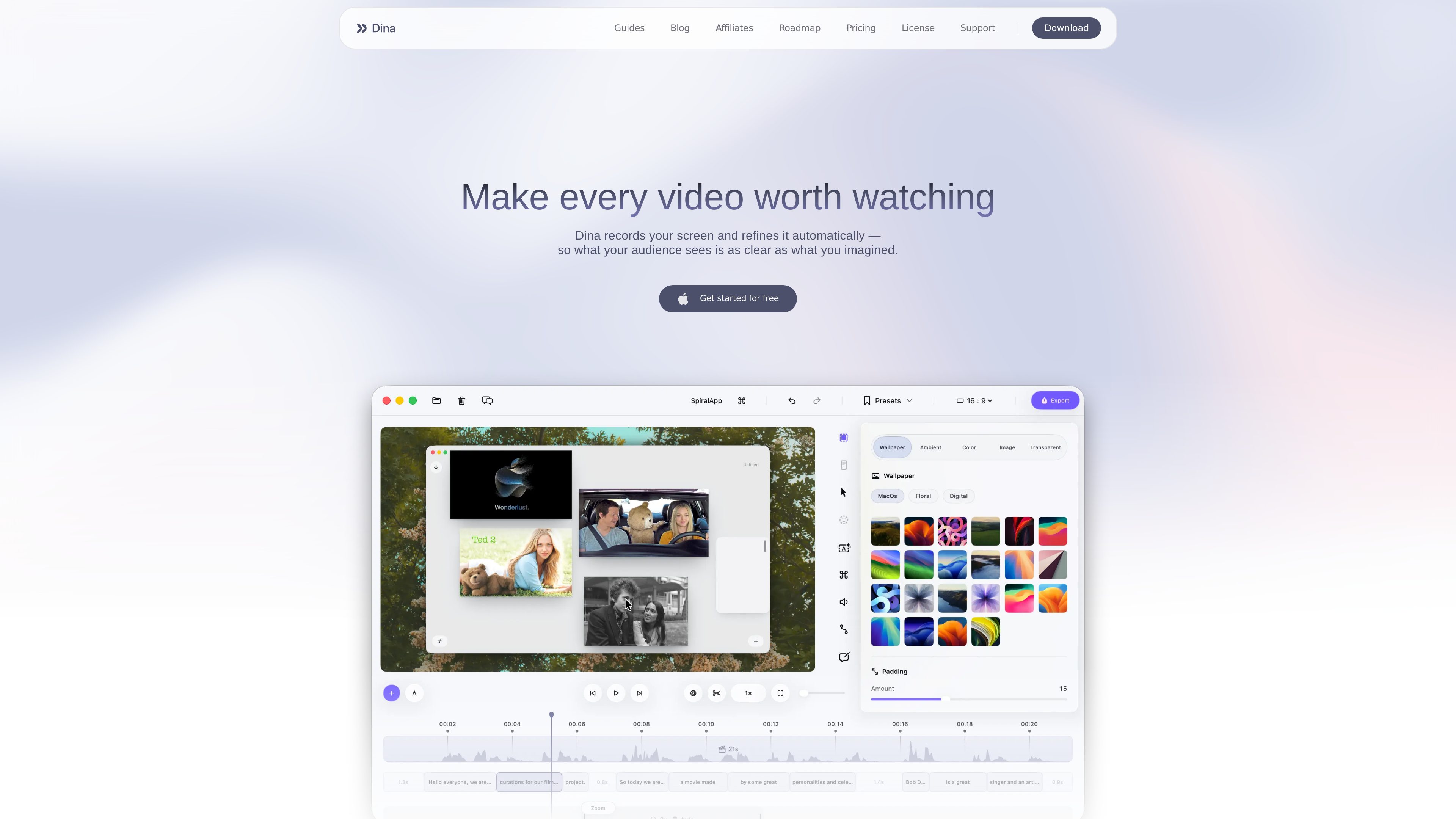
Dina is a macOS tool for recording screens and turning captures into presentation-ready videos. It records a display, window, or selected area alongside microphone, camera, system audio, cursor activity, and keystrokes.
Its editing workflow combines a timeline with transcript-based controls and presentation effects. Automatic zoom, cursor refinement, captions, layouts, annotations, voiceovers, and 3D motion help shape a recording without requiring a separate tool for each step.
Record a display, window, or selected area with microphone, webcam, system audio, and keystrokes from one control. Recording can also be paused and resumed, or scheduled for a later start.
Dina can detect key interactions and zoom into them automatically, while manual controls let you choose the focal point and adjust zoom animations.
Edit recordings on a full timeline or by changing the generated transcript. AI-assisted editing can remove words, filler phrases, and silences while keeping the video synchronized.
Use backgrounds, spacing, text, slides, masking, highlights, callouts, shapes, and arrows to organize scenes and direct attention. Cursor appearance, webcam placement, and keyboard-shortcut display are configurable.
Generate editable captions, record voiceovers into the timeline, or create AI voiceovers from a written script. Webcam size, shape, roundness, and position can be adjusted within the frame.
Add 3D camera movement, perspective, roll, distance, and depth blur. iPhone recordings can be presented in device mockups, while exports support original resolution, 4K options, and separate layers such as the cursor.
Record an application while automatic or manual zoom keeps important interactions visible. Annotations, callouts, and cursor effects can clarify the sequence for viewers.
Capture a complete workflow with system audio, narration, captions, and keyboard shortcuts, then remove pauses or filler through the timeline or transcript.
Combine screen footage with text, slides, backgrounds, and webcam video to create structured presentations or asynchronous project updates.
Record an iPhone through a USB connection or an iPhone mirroring window, then place the footage in supported device mockups for app demos and user-flow explanations.
Schedule a recording when the capture must begin unattended, save presets for recurring visual treatments, and share completed videos through generated links.
Dina is available for Mac and the download page specifies macOS Sequoia 15.0 or later.
It can capture a display, window, or selected area, along with microphone, camera, system audio, cursor activity, and keystrokes. It also supports recording an iPhone through a USB connection or an iPhone mirroring window.
Yes. Dina generates a transcript that can be edited to remove words, filler phrases, and silences, with the changes synchronized to the timeline.
Yes. You can record voiceovers directly into a project, generate AI voiceovers from text, and edit automatically generated captions for wording and timing.
The source describes original-resolution and 4K exports, separate layer exports for elements such as the cursor, and shareable links that let viewers watch without downloading or installing Dina. Specific integrations and destination services are not established.
Les données de trafic sont fournies à titre indicatif uniquement.

isolate.video
isolate.video est une application de montage vidéo qui transforme les enregistrements d’écran en vidéos produit soignées grâce au zoom automatique, à la musique AI et aux effets de projecteur. Elle aide les créateurs de démos produit et d’autres vidéos enregistrées à l’écran à obtenir plus vite un export final.

canvid.com
Enregistrement d’écran pour Windows et Mac avec montage, sous-titres, nettoyage vocal par IA et partage.

detail.co
Detail est une application de capture et de montage vidéo pour iOS et macOS, avec téléprompteur, sous-titres, écran vert et montage automatique pour les créateurs.

kapwing.com
Plateforme web de création et montage vidéo avec IA, sous-titres, traduction, doublage et collaboration.

devmotion.app
DevMotion est une plateforme de création et de montage vidéo par IA dans le navigateur, conçue pour les lancements de produits, les démos, les publicités et les annonces de fonctionnalités. Elle transforme des prompts ou des URL de produits en projets vidéo HTML modifiables, avec animations, voix off, musique, sous-titres et commandes de timeline.

flexclip.com
FlexClip est un outil en ligne de création et de montage vidéo avec des modèles, un montage sur la timeline et des outils d’IA pour créer, modifier et partager des vidéos. Il aide les particuliers et les équipes à réaliser depuis leur navigateur des contenus pour les réseaux sociaux, des vidéos explicatives, des leçons et des clips de marque.