
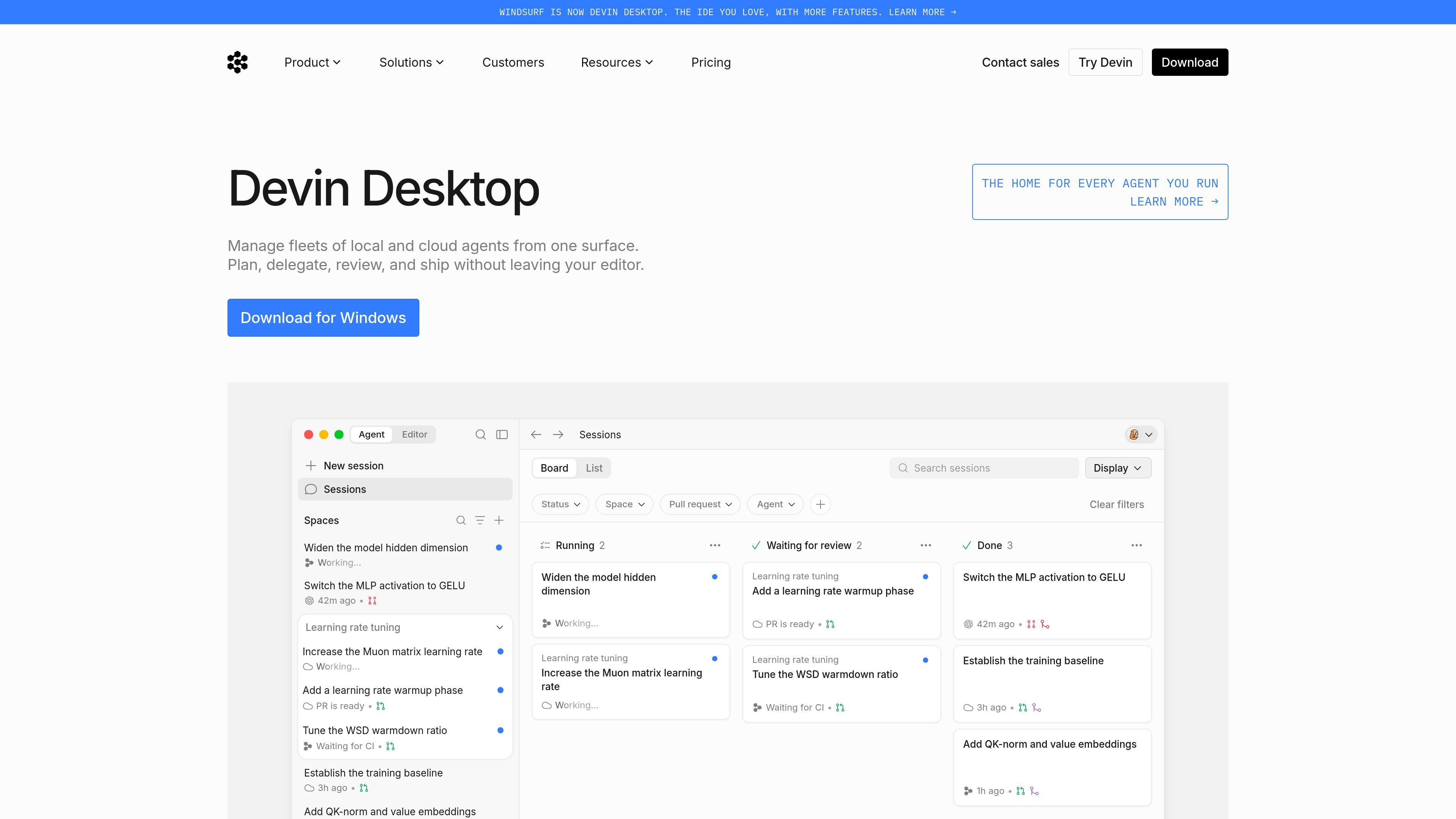
Single surface for agent management
Manage local and cloud agents from one surface, with the product positioned as a command center for dispatching and monitoring agent work.

Devin Desktop gère les agents locaux et cloud dans un espace de travail unique sur Mac, Windows et Linux.
Devin Desktop is Windsurf’s desktop app for managing local and cloud agents in one workspace. The product is described as a command center that lets users plan, delegate, review, and ship agent work without leaving the editor.
The site presents it as a way to coordinate multiple agents, preserve context between tasks, and keep development work close to the local machine when teams want a faster, more hands-on environment. It is available on Mac, Windows, and Linux, with additional access through a JetBrains plugin and a local CLI.
Manage local and cloud agents from one surface, with the product positioned as a command center for dispatching and monitoring agent work.
Plan, delegate, review, and ship without leaving the editor, keeping the workflow centered in the desktop app.
Support for multi-agent coordination is called out in the home page copy, with context shared across agents in one place.
The download page lists downloadable apps for Mac, Windows, and Linux, plus a JetBrains plugin and a local CLI.
The pricing page states that Devin Desktop is included across plans, with team and enterprise options for shared billing, admin controls, and support.
Coordinate several agents across related work while keeping their context in one place, which is useful when tasks need to be reviewed together or handed off between steps.
Run agent-assisted development from the desktop app when you want the flexibility of local machine permissions and a more hands-on environment.
Use the product in a team setting where centralized billing, shared collaboration, and admin controls are important.
Download the app on Mac, Windows, or Linux, or use the JetBrains plugin or CLI when your workflow depends on those environments.
Start with a free plan for light agent usage, or move to paid plans when you need broader model access, cloud agents, or higher quotas.
Devin Desktop is the new name for Windsurf. The download page says the IDE experience remains accessible while the product adds an Agent Command Center for Spaces, Kanban view, and multi-agent management.
Yes. The download page says your plan, pricing, extensions, settings, and in-progress work carry over automatically during the over-the-air update from Windsurf.
No. The download page says your current plan and pricing stay exactly the same, including legacy Windsurf Enterprise plans.
Windsurf for JetBrains is still available for IntelliJ IDEA, PyCharm, WebStorm, and more, according to the download page.
Paid plans refresh usage allowances automatically on a daily and weekly basis. If you go beyond the included usage on a paid plan, you can buy extra usage at API pricing.
Les données de trafic sont fournies à titre indicatif uniquement.

agentgrid.sh
AgentGrid est une application de bureau qui permet de gérer plusieurs agents IA sur un canevas infini, avec terminaux, navigateurs, notes et outils de code dans le même espace de travail. Elle s’adresse aux développeurs qui orchestrent visuellement des tâches parallèles d’agents sur macOS, Windows et Linux.

opencodesuper.app
OpenCode Superapp est un espace de travail natif pour Mac qui permet d’utiliser des modèles d’IA locaux, auto-hébergés ou dans le cloud, avec du code, de l’automatisation du navigateur, la voix, des extensions, des widgets et un accès à distance sécurisé. Il s’adresse aux personnes qui souhaitent un environnement OpenCode privilégiant le local, sans compte.

browseros.com
BrowserOS est un navigateur IA open source doté d’agents locaux pour automatiser les tâches web à partir d’instructions en langage naturel. Compatible avec macOS, Windows, Linux, les extensions Chrome et les intégrations MCP.

1code.dev
1Code est un client visuel open source pour agents de programmation, réunissant Claude Code et Codex avec des flux desktop et web, des revues et fusions Git, et des exécutions en arrière-plan dans le cloud.

cosyra.com
Cosyra est un terminal cloud mobile destiné aux développeurs qui souhaitent exécuter des agents de programmation IA depuis un iPhone ou un appareil Android sans gérer leur propre VPS. Il fournit un espace de travail Ubuntu isolé, un stockage persistant et une facturation avec votre propre clé API.

voidleap.com
Voidleap Code est un IDE de bureau destiné aux développeurs professionnels et aux ingénieurs en IA qui créent des logiciels avec des agents IA. Il s’exécute en local sur Mac et Windows, prend en charge les comptes de fournisseurs cloud ou les modèles locaux et permet d’inspecter et de contrôler les prompts, les appels d’outils, le contexte et les modifications de fichiers.