
Aura logo

Aura

Freemium
Visiter

Aura est un créateur de sites web basé sur le Web et propulsé par l’IA, conçu pour créer des pages d’atterrissage et de petits sites marketing. Il réunit la découverte de modèles, l’édition visuelle et des outils CMS ; les offres payantes proposent aussi des options d’exportation.

Qu'est-ce que Aura ?

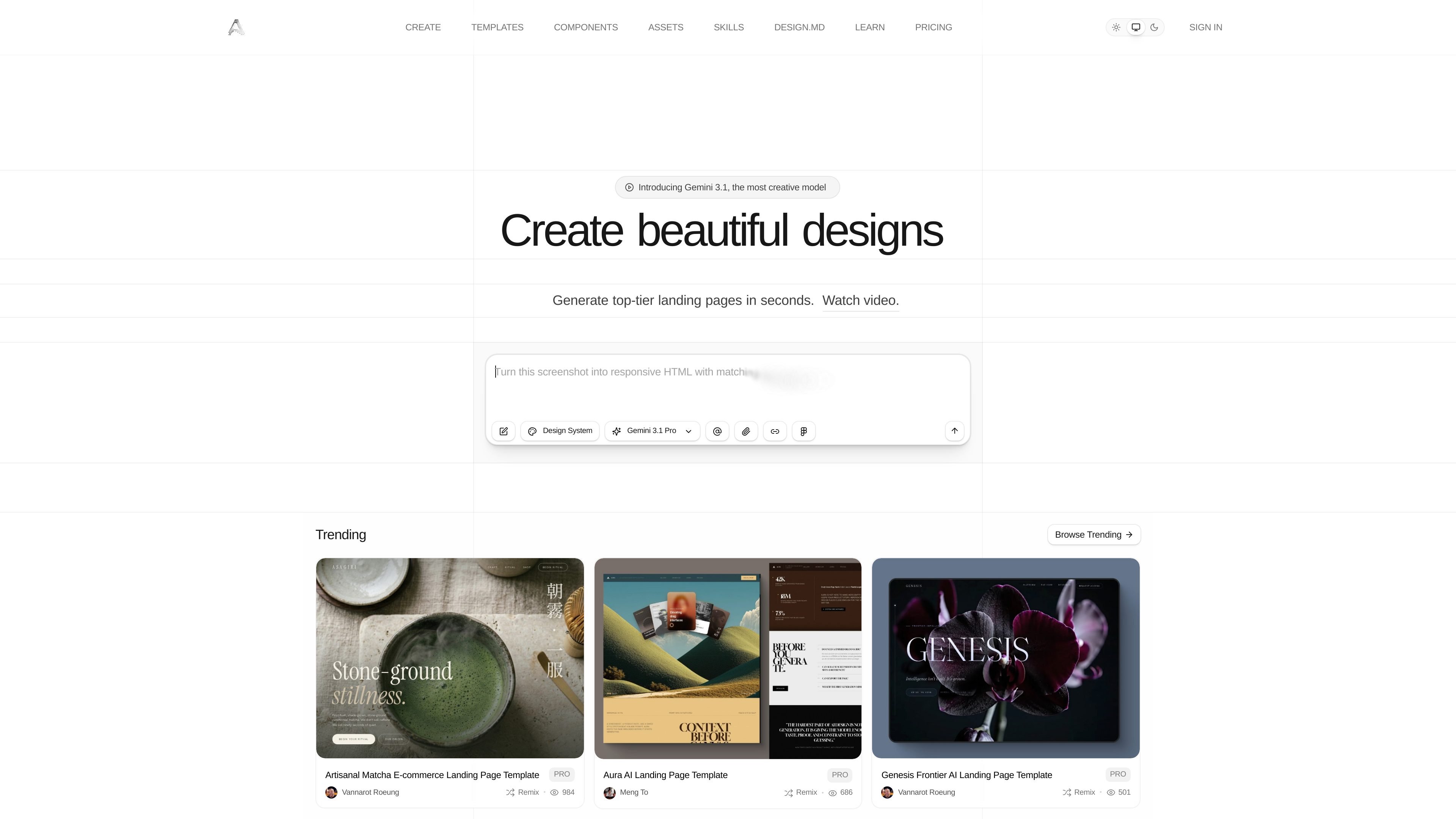
Aura is an AI website builder for creating landing pages and small marketing sites. The homepage presents it as a way to generate responsive designs quickly, then refine them in a visual editor with templates, components, images, icons, CMS tools, and SEO controls.

Its workflow combines AI generation with hands-on editing. Users can browse free, pro, and paid templates, remix them, adjust typography and colors, edit in preview/design/code modes, and publish or export the result on paid plans.

Que peut faire Aura ?

AI page generation from templates

Start from templates and components, then use AI to generate landing pages and supporting visuals. The homepage highlights template browsing, component reuse, image generation, and icon generation as part of the creation flow.

Visual editing with code access

Edit the site in a visual builder with separate Preview, Design, and Code modes. You can click elements to change text and styling, or switch to raw HTML and Tailwind classes for more direct control.

Typography and color management

Manage typography and color settings from dedicated panels that detect active styles in the page. The design guide describes bulk font changes, font pairings, light/dark color switching, and color replacement tools.

Asset and image workflow

Work with assets through built-in image and component pickers. Aura can browse its own library, use Unsplash, upload files, replace elements with prebuilt components, and remix images with AI.

CMS and multi-page site support

Build larger sites with CMS support and multi-page navigation. The pricing and FAQ content mention page limits, CMS collections and items, team invites, and support for linking elements between pages.

Export and publishing options

Publish with product-specific outputs and export formats. Paid plans include HTML and Figma export, custom domains, private sharing options, and the ability to copy DESIGN.md and full prompts from templates.

Cas d'utilisation

“Create a new landing page”

Useful for designers or marketers who want to turn a starting brief or screenshot into a responsive landing page, then refine spacing, typography, imagery, and copy without leaving the browser.

“Refine an existing design”

Useful for teams that need to update an existing page visually while still having access to HTML and Tailwind classes for detailed adjustments.

“Build a multi-page marketing site”

Useful for sites that need multiple pages and CMS-managed content, such as product pages, feature pages, or resource sections linked together in one build.

“Remix templates and export assets”

Useful for people who want to start from a template, swap sections or components, and then export the result as HTML or Figma on a paid plan.

“Evaluate usage before subscribing”

Useful for builders who want to test the product on a short trial before committing, or for users who need to add more prompts with paid credit packs.

Questions fréquentes

How do I edit a design in Aura?

Aura supports a visual workflow for editing designs after generation. The editor includes Preview Mode for viewing the site as visitors see it, Design Mode for clicking elements to change text, images, and styles, and Code Mode for editing raw HTML and Tailwind classes directly.

Does Aura offer a trial?

Yes. Aura's pricing page says Pro, Max, and Ultra trials begin with 3 days and 20 trial prompts, and a payment method is required. If you cancel before the trial ends, you are not charged.

Can I change plans later?

The pricing page says plans can be upgraded or downgraded at any time. Upgrades take effect immediately, while downgrades take effect at the start of the next billing cycle.

Can Aura build multi-page sites?

Aura can create complete multi-page websites. The help content says you can add as many pages as needed and link elements to pages for navigation.

What integrations or export options are supported?

The source material confirms HTML export and Figma export on paid plans, plus custom domains and private publishing on higher tiers. It does not provide a complete list of every deployment destination or third-party integration.

Informations rapides

Category
AI website builder
Primary use
Landing pages and small marketing sites
Platform
Web app
Source domain
aura.build
Pricing
Free plan, paid plans, and a 3-day trial on Pro, Max, and Ultra

Analyse du trafic de Aura

Les données de trafic sont fournies à titre indicatif uniquement.

Évaluation du domaine
52

Alternatives à Aura

Pixelesq logo

Pixelesq

pixelesq.com

Pixelesq est un créateur de sites web no-code et une plateforme WebOps native à l’IA pour les équipes marketing, réunissant création de pages, formulaires, hébergement, SEO, analyses et optimisation.

Hocoos logo

Hocoos

hocoos.com

Créateur de sites web IA pour petites entreprises, avec édition simple et téléchargements jusqu’au 23 avril 2026

Fimo logo

Fimo

fimo.ai

Fimo est une plateforme autonome pour sites web combinant CMS connecté au dépôt, édition visuelle et agents IA pour les tâches récurrentes.

Solo logo

Solo

soloist.ai

Solo est un créateur de sites web gratuit basé sur l’IA, conçu pour les entreprises qui souhaitent lancer un site à partir de quelques informations simples. Il prend en charge les domaines personnalisés, le paramétrage SEO, les statistiques, les liens de réservation et l’importation de contenu depuis des sources web existantes.

SiteJourney logo

SiteJourney

sitejourney.ai

Créateur de sites IA pour créer, modifier et publier un site par prompt

Wegic logo

Wegic

wegic.ai

Wegic est un créateur de sites web avec IA pour concevoir, modifier et publier des sites personnalisés par chat, sans coder.