
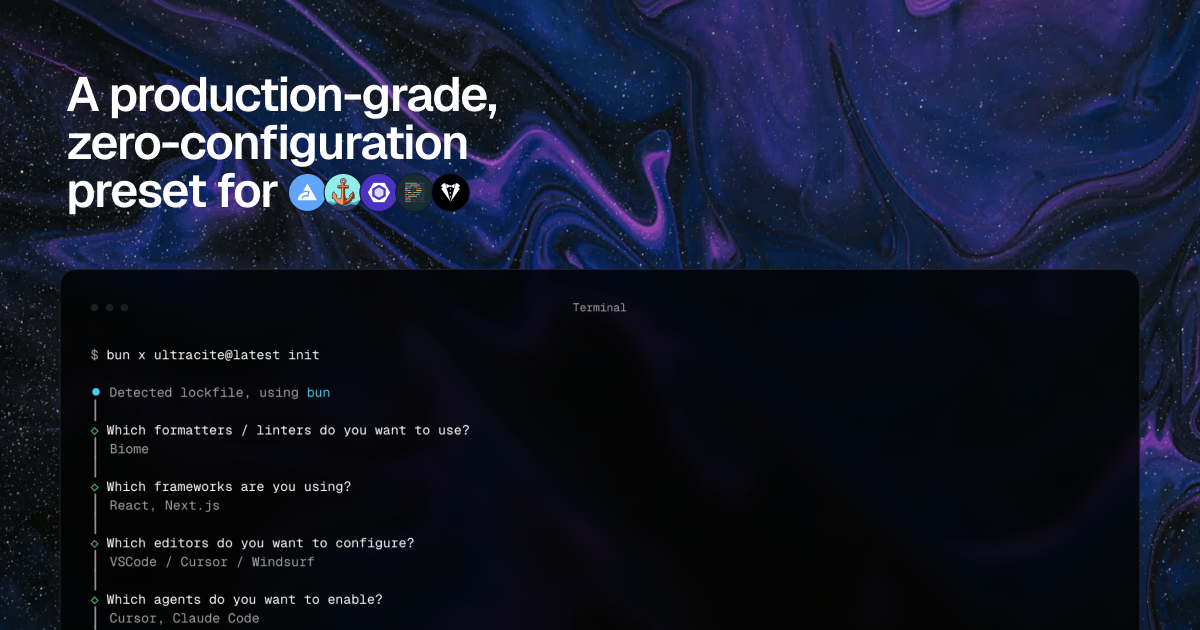
Custom install command generation
Generate a stack-specific init command after choosing a linter, frameworks, editors, agents, and optional hooks. The install page shows the command changing based on the selected setup.

Ultracite es un preset sin configuración para ESLint, Biome y Oxlint que ayuda a equipos y a la IA a escribir código coherente y seguro en cuanto a tipos. Genera ajustes del editor, instrucciones para agentes y hooks para alinear los estándares en flujos humanos y de IA.
Ultracite is a zero-config preset for ESLint, Biome, and Oxlint that helps teams and AI produce consistent, type-safe code. It is positioned as a production-grade setup that generates linting, formatter, editor, and agent configuration from one install flow.
Instead of requiring teams to hand-maintain separate rules for editors and AI tools, Ultracite creates repo-specific files such as workspace settings, agent instructions, and hooks. The site emphasizes keeping code style, linting, and TypeScript defaults aligned across contributors while still allowing framework-specific rules and optional customization.
Generate a stack-specific init command after choosing a linter, frameworks, editors, agents, and optional hooks. The install page shows the command changing based on the selected setup.
Choose between Biome, ESLint + Prettier + Stylelint, or Oxlint + Oxfmt when generating your configuration. The site presents Ultracite as a preset that adapts to the linting toolchain you already use.
Add framework-specific rules for React, Next.js, Solid, Vue, Svelte, Qwik, Angular, Remix, TanStack, Astro, NestJS, Jest, and Vitest/Bun. The homepage also shows framework-aware presets in its configuration examples.
Generate editor settings that enable format-on-save, auto-fixes, and TypeScript defaults. The VS Code page shows committed workspace settings for consistent behavior across contributors.
Create rules files and hooks for AI agents so terminal or chat-based edits follow the same standards as human-written code. The source pages mention support for AGENTS.md, CLAUDE.md, and other agent-specific files.
Use the integrated `fix`, `check`, and `doctor` commands referenced in the Claude Code rules output to inspect or repair code and diagnose setup issues. The source also describes MCP support for linting and formatting without running Ultracite locally.
Use Ultracite when you want a new repository to start with shared linting and formatting rules without manually wiring every config file. The init flow generates the relevant preset based on your stack choices.
Use the editor configuration output when a team needs format-on-save and auto-fixes to behave the same way in Visual Studio Code across multiple contributors. The page shows committed workspace settings designed for shared projects.
Use agent files and hooks when AI tools are part of the workflow and you want those edits to follow the same standards as the rest of the repo. The site shows generated instructions for Claude Code and support for many other agents.
Use framework-specific presets when a project combines a JavaScript or TypeScript framework with linting rules tailored to that stack. The homepage examples include React, Next.js, Vitest, and other common frameworks.
Use the generated `fix`, `check`, and `doctor` commands when you need to verify formatting, inspect rule violations, or diagnose setup issues from the terminal. The Claude Code instructions surface those commands directly in the generated rules file.
Ultracite is configured through its init flow, which generates the linting, editor, and agent files that match your selected stack. The homepage and install page show setup paths for Biome, ESLint + Prettier + Stylelint, or Oxlint + Oxfmt, plus editor and agent files such as `.vscode/settings.json`, `AGENTS.md`, and `CLAUDE.md`.
The source pages show support for Visual Studio Code and Zed on the editor side, and agent files or hooks for tools such as Claude Code, Cursor, Windsurf, CodeBuddy, GitHub Copilot, Aider, Amazon Q CLI, Gemini, and Replit. The homepage also says Ultracite supports 40+ agents.
Ultracite is designed to generate shared workspace settings and rules files so contributors and AI tools follow the same formatting and linting standards. The VS Code page specifically describes committed workspace settings that keep behavior consistent across contributors.
Yes. The Claude Code page shows Ultracite writing instructions to `.claude/CLAUDE.md` and a companion hook config at `.claude/settings.json`, and the homepage says it can generate agent hooks for supported tools.
The site presents Ultracite as a preset for ESLint, Biome, and Oxlint rather than a hosted service, and it emphasizes installing it into your codebase with `npx ultracite@latest init` or a custom install command. Pricing details are not shown in the provided source text.
Los datos de tráfico son solo como referencia.

inceptionlabs.ai
Inception desarrolla modelos de lenguaje grandes basados en difusión bajo la marca Mercury, como Mercury 2 para razonamiento y Mercury Edit 2 para edición de código, orientados a equipos que necesitan modelos rápidos y controlables para aplicaciones basadas en API, flujos de desarrollo, voz, agentes y búsqueda.

lunary.ai
Plataforma de observabilidad y gestión de prompts para aplicaciones basadas en modelos de lenguaje (LLM). Ayuda a los equipos a supervisar, mejorar y proteger chatbots, agentes y otros flujos de trabajo con LLM.

www.cosmicjs.com
Un marketplace para instalar plugins de proveedores en el agente Cosmic responsable de una tarea. Está pensado para equipos que utilizan agentes Cosmic, herramientas MCP y flujos de trabajo relacionados con contenido u operaciones.

osohq.com
Oso para agentes es una plataforma de seguridad y control de agentes de IA que ayuda a los equipos a descubrirlos, supervisarlos, detectarlos y gobernarlos en producción.

getunblocked.com
Unblocked es un motor de contexto para equipos de ingeniería que convierte código, documentación, tickets y conversaciones en contexto práctico para revisiones de código, preguntas y respuestas y flujos de trabajo de programación con IA.

superagent.sh
Superagent es un producto de seguridad con IA para código y agentes que detecta y corrige vulnerabilidades de forma continua y entrega cada solución como una solicitud de incorporación de cambios. Gratis para repositorios públicos de GitHub; plan personalizado para repositorios privados y equipos.