音虫(SoundBug) logo

音虫(SoundBug)

Freemium
Visitar

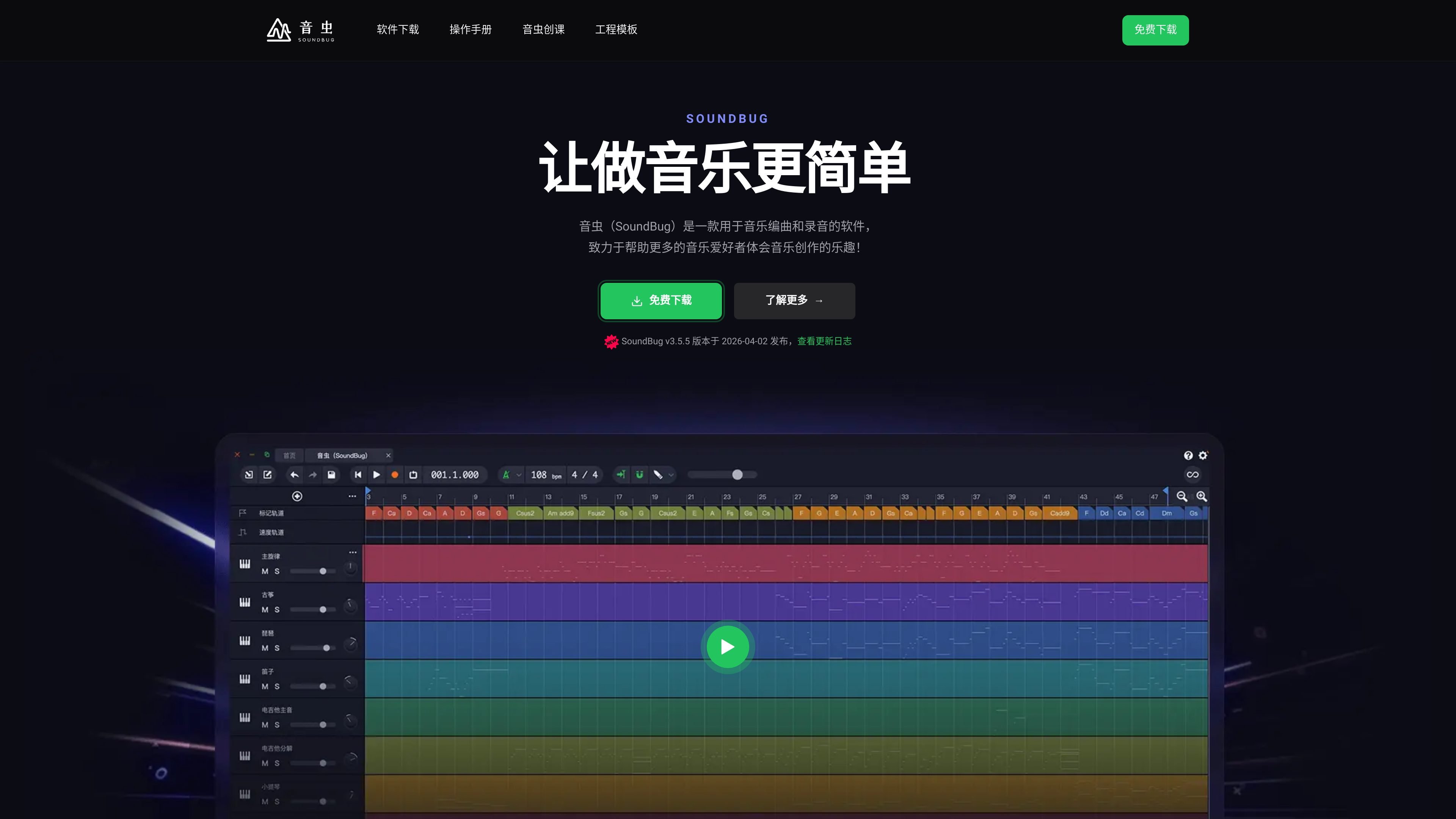
音虫(SoundBug) es un software para arreglos, grabación y composición musical en Windows y Mac, con manuales, cursos y planes educativos para escuelas.

¿Qué es 音虫(SoundBug)?

SoundBug is software for music arranging, recording, and composition, designed for students, music enthusiasts, and teaching scenarios that want to create music. The official website positions it as a tool that “makes music creation easier” and emphasizes its goal of lowering the barrier to music creation so more people can get started directly.

Based on the official website information, SoundBug offers built-in virtual instruments, classic phrases, AI arranging, VST/VST3 plugin support, and downloadable versions for Windows and Mac. The site also includes a user manual, course content, and school-focused teaching versions, showing that it is designed not only for individual creation but also for learning and classroom use.

¿Qué puede hacer 音虫(SoundBug)?

Built-in Large Library of Virtual Instruments

The homepage clearly states that the software includes 600+ virtual instruments and emphasizes realistic sound reproduction. The membership page and downloads page also list 600 virtual instruments as a standard benefit.

Provides Classic Phrase Materials

The official website showcases 600+ built-in classic phrases that can be used to quickly build basic material and reduce the time needed to arrange from scratch.

Supports VST and VST3 Plugins

The homepage states support for VST and VST3, allowing compatibility with mainstream plugins and suitable for users who need to expand their sound and effects workflow.

AI Arranging Assistance

Both the homepage and membership page mention AI arranging, described on the official website as helping users who do not know how to arrange music complete their works quickly.

Supports Windows and Mac

The downloads page provides Windows and Mac versions, and the homepage also directly labels Windows and Mac, showing that the software covers mainstream desktop platforms.

Courses and User Manual Included

The courses page provides content ranging from basic operations to arranging, mixing, music theory, and vocal performance, forming a relatively complete learning path alongside the software.

Casos de uso

“Beginner Learning and Self-Study”

Suitable for people who are just starting out in music production to begin with the basic interface, user manual, and introductory courses, then gradually understand the software operations and complete simple works.

“Rapid Arranging and Turning Ideas into Tracks”

Suitable for users who want to quickly build the outline of a track by using built-in virtual instruments, classic phrases, and AI arranging to speed up the process from inspiration to an audible demo.

“Classroom Teaching and Music Courses”

Suitable for teaching scenarios that need arranging, mixing, music theory explanations, or vocal demonstrations. The official website provides dedicated course content and school edition plans.

“Plugin-Expanded Creation”

Suitable for users who already have a plugin-based workflow and want to continue expanding sounds and effects with VST and VST3 inside SoundBug.

“Desktop Personal Production”

Suitable for individual users who want to do everyday music production on Windows or Mac. The downloads page provides the corresponding desktop versions.

Preguntas frecuentes

What devices or systems does SoundBug support?

SoundBug’s official website provides a free download entry. The downloads page separately lists Windows and Mac versions. It also provides a backup download link for the Windows version and a download entry for the “Shanghai City Air Classroom Special Edition.”

What are the differences between SoundBug’s membership plans?

According to the official website, both the Personal Standard Edition and the School Standard Edition include 600 original virtual instruments, an expandable MIDI library, unlimited AI arranging, and unlimited version upgrades. The Forever Free Edition is for personal learning use and provides 40 original virtual instruments, an expandable MIDI library, and unlimited version upgrades.

What kind of learning path is SoundBug suitable for?

The official courses page clearly offers an introductory tutorial, music production basics, complete song production, chord exploration, and pop band arrangement courses, along with theory videos, operation demo videos, and project examples. It is suitable for step-by-step learning by course.

How can new users start using SoundBug?

The user manual page describes it as a detailed guide with clear steps and instructions designed to help users get started quickly. Combined with the courses and downloads pages, it is suitable to install the software first and then learn the basic operations through the manual and courses.

Datos rápidos

Category
Music arranging / recording / composition software
Platform
Windows, Mac
Primary Users
Students, music enthusiasts, music teachers, school teaching scenarios
Website
soundbug.com
Pricing Model
Offers a free version, plus Personal Standard and School Standard membership plans
Workflow Features
Built-in instruments, classic phrases, AI arranging, plugin expansion, course-based learning

Análisis de tráfico de 音虫(SoundBug)

Los datos de tráfico son solo como referencia.

Valoración del dominio
20

Alternativas a 音虫(SoundBug)

OnSecurity logo

OnSecurity

onsecurity.io

OnSecurity ofrece pruebas de penetración aprobadas por CREST para empresas del Reino Unido, combinando automatización impulsada por IA con pruebas manuales expertas, además de análisis continuo de vulnerabilidades e inteligencia sobre amenazas mediante suscripción.

Wave Terminal logo

Wave Terminal

waveterm.dev

Wave Terminal es un terminal de código abierto para macOS, Linux y Windows que reúne vistas previas y edición de archivos, navegación web, paneles y gestión de máquinas remotas en un mismo espacio de trabajo.

Midship logo

Midship

midship.ai

Midship es una solución de IA para pruebas SOX que sigue planes de auditoría, realiza pruebas y genera papeles de trabajo documentados con enlaces a evidencias revisables.

Matt Giaro logo

Matt Giaro

mattgiaro.com

Matt Giaro es un sitio de contenido y marketing que ayuda a expertos y creadores a monetizar sus conocimientos mediante contenido en línea, cursos, email marketing y automatización, con sistemas repetibles para crear más rápido y convertir ideas en ingresos.

Sound Effect Generator logo

Sound Effect Generator

soundeffectgenerator.org

Crea efectos de sonido personalizados a partir de texto o vídeos con IA, con acceso diario gratuito y planes de pago para generación privada, de alta calidad y uso comercial.

Bulbthings logo

Bulbthings

bulbthings.com

Bulbthings es una plataforma de gestión de activos que permite controlar equipos, inventario, mantenimiento y flujos de trabajo relacionados desde un solo sistema. Ofrece un plan gratuito para equipos pequeños y planes de pago y servicios adicionales para necesidades mayores o más específicas.